Connect your business platforms

API integration services that connect your tools and workflows.

I’m Sedrick Balandra. I provide API integration services for CRM, accounting, scheduling, communication, and custom applications, so data can move through your business with clear rules and useful visibility.

Based in Lucena City, Philippines · Available for remote projects

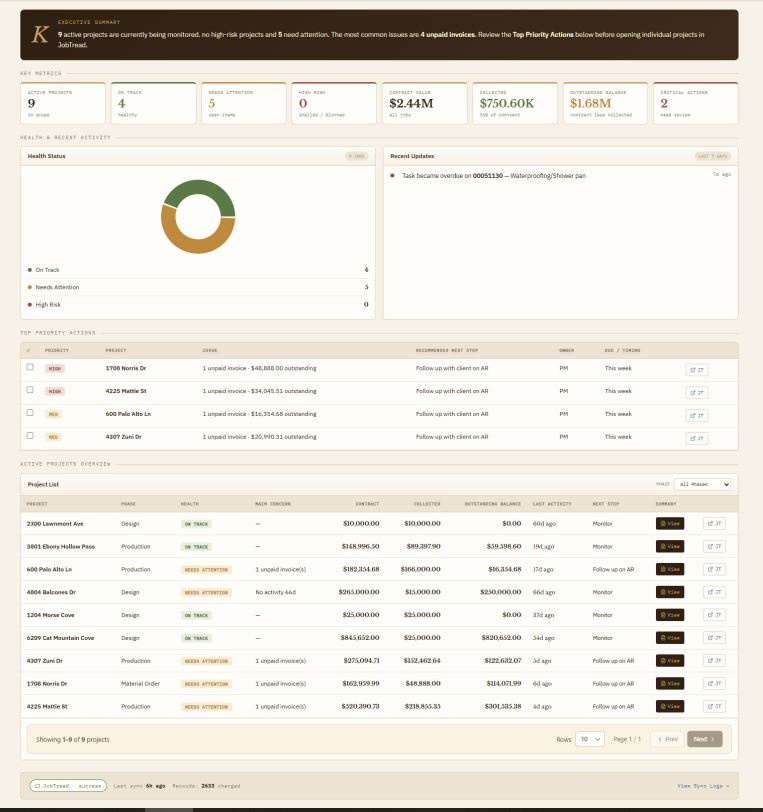
Kane Sync Hub project-health dashboard connecting JobTread and QuickBooks Online records
Portfolio project: Kane Sync Hub · An operational workspace across JobTread and QuickBooks Online.

The work between the tools

Define what moves, where it belongs, and what happens next.

Integration work starts with the workflow: which platform owns each record, which fields need to move, and whether an update should create a task, change a status, or appear in a report.

That is useful when your team repeats data entry, compares records manually, or cannot tell whether a dashboard reflects the latest information.

Integration work I can scope

  • API connections between custom applications and business platforms.
  • CRM, scheduling, messaging, and invoicing handoffs through webhooks.
  • Data mapping and synchronization with identifiable source records.
  • Operational dashboards combining information from separate systems.
  • Automation with n8n, Make, or Zapier where those platforms fit the requirements.

Integration approach

Build the connection and the way to inspect it.

  1. Check the platform accessReview API availability, authentication, permissions, rate limits, sample data, and account requirements. Define the source of truth and allowed update directions.
  2. Map and implementBuild the field mapping, connection, and workflow. Account for duplicate events, record changes, failures, and retries as needed for the integration.
  3. Validate and observeCheck agreed records and user paths against their sources. Include appropriate logs, sync states, and recovery steps so the owner can inspect connection problems.

I work with APIs, webhooks, TypeScript, Supabase, PostgreSQL, and automation platforms. AI-assisted development supports prototyping and repetitive code; I review the architecture, mappings, code, and tests before delivery.

Selected portfolio work

See integrations in the context of daily work.

Construction · JobTread + QuickBooks Online

Kane Sync Hub

A documented internal console combining project records from JobTread with accounting data from QuickBooks Online. The case study covers source mapping, financial views, role-based access, and visible sync states.

Explore the integration case study →

Personal build · In progress

Portfolio Admin CRM

A private CRM connecting website enquiries, email, scheduling, documents, and per-channel AI assistants. The case study describes implemented behavior and ongoing work, including review rules for AI-assisted email replies.

Explore the connected CRM workflow →

Before starting

Questions about API integrations

Can you connect the platforms we already use?

Often, if the platforms provide suitable APIs, webhooks, exports, or supported connectors. Send the platform names and the workflow you want to connect. Access and API limitations need to be checked before the scope is confirmed.

Does JobTread already connect to QuickBooks Online?

Yes. JobTread has a native QuickBooks Online integration. I review its capabilities and your current setup before proposing custom work. If an agreed requirement remains, such as combining additional sources in a report or giving different team roles a tailored operational dashboard, we can scope that separately. The goal is to use the native connection where it fits and build around a documented business need.

Should we use n8n, Make, Zapier, or custom code?

The choice depends on supported connectors, data transformations, execution volume, error handling, and ownership. An automation platform can suit a standard workflow; custom code may fit requirements that need closer control. We can compare those options for your process.

Will updates happen in real time?

That depends on whether the source supports webhooks, its delivery behavior, and the receiving workflow. Some integrations need scheduled polling. We define the expected update delay and how the system shows pending or stale data.

How do you handle duplicate records or failed updates?

We define record identifiers, matching rules, and how repeated events should be handled. Error reporting, retry behavior, and recovery steps are scoped around the platform and workflow so failures can be investigated.

What access do you need from the business?

Typically, the relevant API documentation, account or sandbox access, permissions to read or update the agreed records, sample data, and an owner who can confirm the mappings. Credentials and authorization must be handled through the project’s agreed access process.
Which tools need to work together?

Share the platforms, the information that needs to move, and what should happen after it moves. We can discuss an integration scope and the access it depends on.

Discuss Your Project →