CRM development & implementation

A CRM that connects your customer journey.

I offer custom CRM development services and GoHighLevel implementation around how your business captures enquiries, manages conversations, follows up, schedules appointments, and delivers work.

Sedrick Balandra · 5+ years of GoHighLevel experience · Remote projects

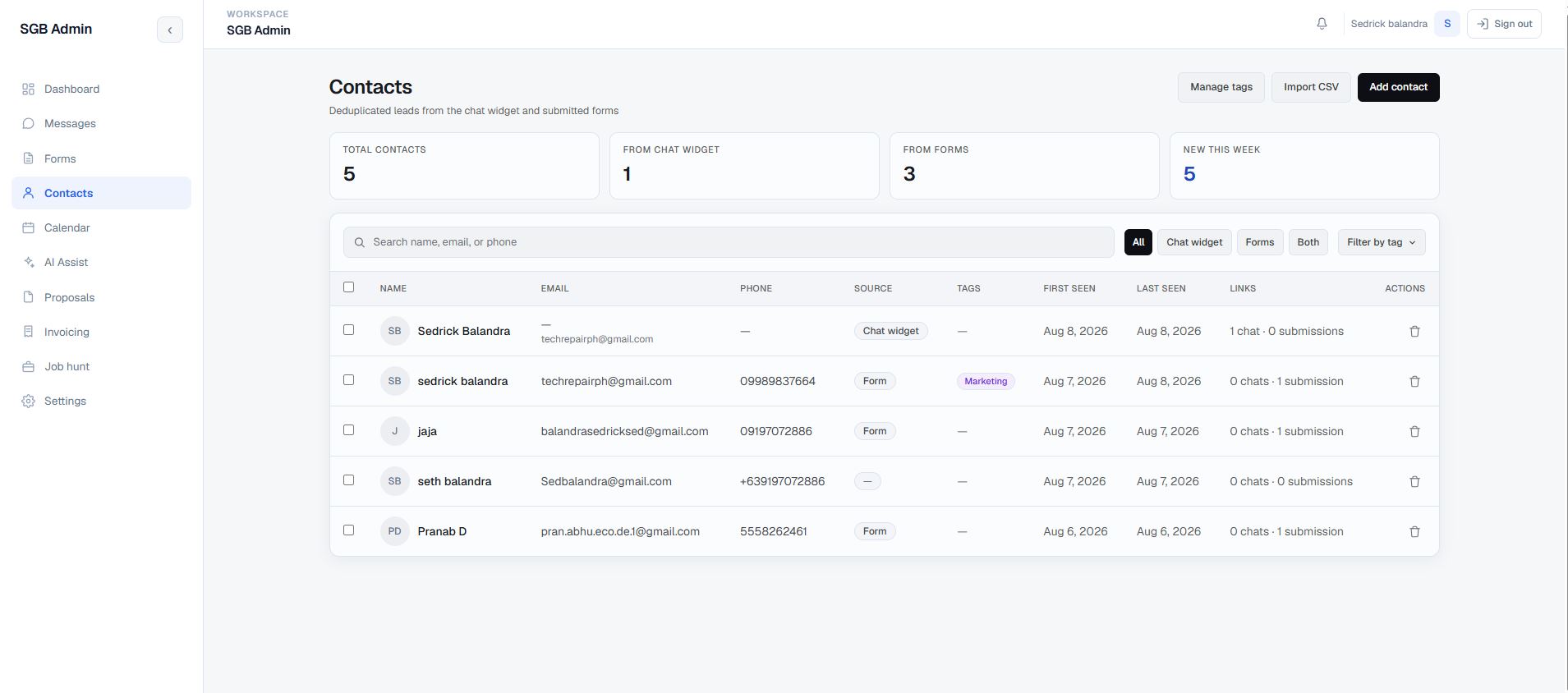
Portfolio Admin CRM contact workspace with searchable records and source filters
Personal build, in progress: Portfolio Admin CRM · A documented contact and conversation workspace.

Designed for the next action

Keep customer context attached to the work.

A CRM should help your team understand who the customer is, what has happened, and what needs attention next. Separate forms, inboxes, appointment tools, and spreadsheets can make that journey difficult to follow.

I work on the records and handoffs behind that experience, whether the solution is a configured GoHighLevel account or a custom application.

CRM workflows I can help build

  • Contact records, lead sources, tags, and structured sales pipelines.
  • Enquiry capture and follow-up connected to website forms and conversations.
  • Appointment scheduling, reminders, and communication workflows.
  • Proposals, invoicing, and the transition from a lead to an active client.
  • AI voice or chat assistance with defined escalation and human review.

Choose the right approach

Configure, extend, or build.

GoHighLevel may suit a business that needs established CRM, funnel, scheduling, and automation features. A custom CRM can fit when the data model, interface, permissions, or delivery workflow needs more control. Integrations can connect either approach to your existing tools.

Read my guide to choosing GoHighLevel or a custom CRM →

GoHighLevel setup and implementation

For a GoHighLevel project, I can configure contact fields and tags, pipelines, forms and funnels, appointment calendars, and follow-up workflows. The scope can also include a reusable snapshot and connections to other tools where supported. We agree on lead sources, team responsibilities, and the journeys to test before making account changes.

  1. Understand the lifecycleMap lead sources, pipeline stages, follow-up rules, responsibilities, and current contact data. Agree on the workflow before choosing the platform.
  2. Implement in stagesConfigure fields, pipelines, permissions, and automation, or develop the custom database and interface. Review the journey with representative records.
  3. Validate the handoffsCheck enquiry capture, record matching, scheduling, message handling, and access. Plan data migration, team guidance, and deployment around agreed requirements.

My custom development stack includes Next.js, React, TypeScript, Supabase, and PostgreSQL. I also work with n8n, Make, and Zapier. AI-assisted development supports prototyping and coding; architecture, code review, testing, and delivery remain my responsibility.
Selected portfolio work

CRM workflows you can inspect.

Personal build · In progress

Portfolio Admin CRM

A private Next.js and Supabase workspace connecting contacts, website enquiries, conversations, scheduling, proposals, invoicing, and AI-assisted replies. The case study documents current features and the boundaries of an ongoing build.

Explore the CRM workflow →

GoHighLevel · Implementation example

EZLeeds Automation

A documented GoHighLevel implementation for legal lead intake, qualification, appointment routing, law-firm partner onboarding, and billing workflows. Explore the workflow scope and screenshots in the case study.

Explore the GoHighLevel implementation →

Before starting

Questions about CRM development

Can you improve our existing GoHighLevel account?

Yes. We can review fields, pipelines, workflows, appointment settings, and connected tools against your business process. The initial scope should identify the specific workflow to improve and the account access needed.

What does GoHighLevel implementation include?

Implementation starts with mapping how leads enter, who follows up, and when a lead becomes a booked appointment or client. The agreed setup can cover pipelines, fields, forms, calendars, automation, and necessary integrations. I test representative journeys with you and document the account settings and workflow handoffs your team needs to maintain.

When would a custom CRM make sense?

When important requirements need a specialized data model, interface, permission structure, or connection to business operations. We can compare a custom build with configuring or extending your current platform before committing to an approach.

Can you import contacts from spreadsheets or another CRM?

A migration can be scoped after reviewing the available exports, field mappings, duplicate records, and linked history. We agree on what should move, test a representative sample, and check the import before relying on the new records.

Can AI handle lead qualification and follow-up?

AI voice or chat can be designed into qualification and follow-up workflows. We need to define what it can answer, which information it should collect, and when a person takes over. Review and sending rules depend on the channels and requirements.

What should I prepare for a CRM project?

Bring your current tools, pipeline stages, lead sources, examples of follow-up, and the people responsible for each step. Sample data, required integrations, account access, and an owner for feedback help define a practical scope.

Where does your customer journey lose context?

Share the tools you use, how enquiries become clients, and the step your team struggles to manage. We can discuss the CRM workflow that would help.

Discuss Your Project →