Practical AI implementation
How to automate business workflows with AI: a practical starting plan.
A useful first project can be an inquiry assistant that prepares a reply for your team to review. Here is how I would scope the workflow, handle exceptions, and check whether it helps.
Start with one workflow and a draft-only pilot
For a small service business, I would start with a recurring task that has a clear owner and a reviewable output. Replying to new inquiries can fit when your team repeatedly reads messages, looks up contacts, and prepares similar responses.
AI interprets the message; fixed rules decide what may happen next. AI might suggest a request category or extract a preferred date. The workflow checks required fields, contact matches, permissions, and approval status. A customer’s message or an AI suggestion does not authorize a record change.
In the initial pilot, save internal drafts for review while keeping automatic sending and customer-record changes disabled. Choose a representative sample, define what a correct draft looks like, and keep the normal manual process available.
Example: from inquiry to reviewed follow-up
This is a hypothetical design for a service business, rather than a claim that every step is already connected in my portfolio CRM.
- Capture the inquiry. Keep the original text, source, receipt time, and message identifier. A webhook can start a workflow when an external event arrives; n8n documents separate test and production webhook URLs. n8n webhook documentation.
- Classify and extract. Ask AI to suggest the service category, contact details, requested date, and unanswered questions. Preserve its suggestions separately from verified customer data. Missing information stays missing.
- Validate the contact. Apply agreed matching rules using existing identifiers and contact details. Conflicting matches go to a person. Record a proposed update for approval instead of allowing a guess to overwrite an established record.
- Prepare a reply. Draft from approved service information and current customer context. A request for Tuesday is a scheduling preference, not a confirmed booking. Leave prices and commitments out unless the information is approved and applicable.
- Review the proposed action. Show the original message, matched contact, draft, and unresolved questions. The reviewer may edit or reject the draft. Later sending requires the agreed approval step and a final check of recipient and current conversation state.
- Record the result and next task. Save the review decision. After an authorized send, store the provider’s reported status and create the agreed follow-up task. Drafted, approved, sent, and failed are separate states.
If you already use GoHighLevel, its AI Extract Data action can turn message text into fields for later workflow steps. It is billed per execution, and missing values may be empty. Check account availability, costs, and validation rules before connecting those fields to record changes. HighLevel extraction documentation.
n8n supports human review for selected AI-agent tools: execution pauses while a person sees the proposed tool input and approves or denies it. That is a concrete approval mechanism to configure, rather than relying on the AI to ask permission. n8n human-review documentation.
Give exceptions a destination
Assign an owner who can inspect failures and resume the manual process. I would include these paths in the first version:
- Missing or duplicate data: request clarification, or place competing contact matches in a review queue. Recognize repeated message identifiers before creating another draft or follow-up task.
- Stale information: refresh the conversation and relevant records before acting. A colleague may already have replied or changed an appointment.
- Uncertain output: route ambiguous categories, unsupported answers, or inconsistent extracted values to a person. An AI confidence score is another input to review, not proof of correctness.
- Failed or unclear sends: check stored identifiers and provider status before retrying. If the delivery outcome is unknown, the owner investigates instead of assuming nothing happened and sending again.
n8n documents error workflows and execution review for investigating failures. Configure the alert destination and response owner as part of the build. n8n error-handling guidance.
What my project work illustrates
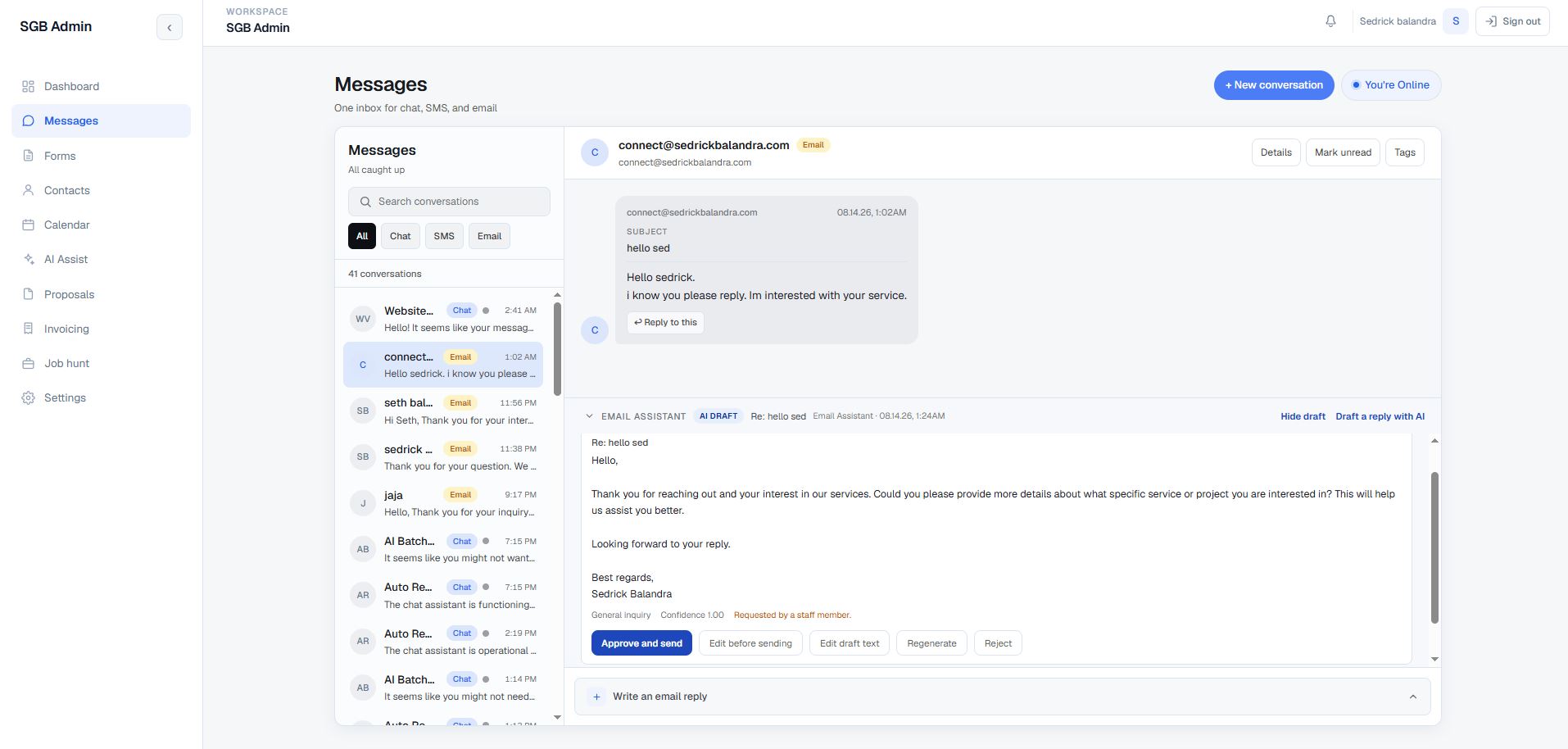
My Portfolio Admin CRM documents an AI draft panel with approve-and-send, edit, regenerate, and reject controls. The personal build remains in progress; Telnyx SMS/calling and Stripe payments are marked not configured.
EZLeeds Automation shows configured intake, call-outcome branches, and booking handoffs in GoHighLevel. Its enrollment snapshots document activity, rather than conversion gains. Kane Sync Hub illustrates explicit source ownership and visible synchronization states across operational and accounting systems. These are useful design patterns to apply to a scoped workflow.
Measure completed work, including corrections
Compare representative inquiries with the existing manual process. Record active minutes spent reading, drafting, reviewing, correcting, and handling failures. Track elapsed response time separately so waiting in a review queue stays visible.
Count approved drafts, rejected drafts, incorrect contact matches, unresolved exceptions, and confirmed sending outcomes. Include provider costs and maintenance effort. A quick draft has limited value if review takes longer than writing the reply yourself.
Use the findings to narrow the categories, improve the reference information, or change the workflow. Expand only after the owner can explain the observed errors and the review burden is acceptable for the business.
A compact rollout checklist
- Choose one task, an owner, and a correct-output example.
- Agree on data sources, allowed actions, and required review.
- Test missing, duplicate, stale, uncertain, and failed cases.
- Run the draft-only pilot with an available manual fallback.
- Measure total effort, errors, waiting, and operating costs.
- Approve any expansion explicitly and keep a pause control.
This starting plan reflects my implementation judgment. Product capability statements link to official documentation checked on October 13, 2026; integration access and provider behavior need checking for each project.
Which recurring workflow would you like to improve?
Bring the current process and a few representative examples. Explore my CRM development service or integration service, then we can discuss a useful first scope.
Discuss Your Project →