Smart Ticketing System

A full-stack customer support and service desk platform designed to help companies capture, manage, prioritize, assign, and resolve support requests from one centralized workspace.

Ticketing SystemSaaSSLA TrackingRBACOpenAI
Self-Initiated SaaS BuildClient
Customer Support / Help DeskIndustry
less than 3 monthsDuration
Next.js · SupabasePlatform
Overview

One workspace for every support request.

This system provides a complete support operation for businesses that need structured ticket management, customer communication, internal collaboration, SLA tracking, reporting, and embeddable website support. Customers can submit tickets through the dashboard or a website chat widget. Support teams can then assign tickets, communicate with customers, add private internal notes, track deadlines, manage escalations, and analyze support performance.

The Problem

Support requests came in with no shared system to track priority, assignment, or SLA deadlines — and website visitors had no direct, structured path into the team's workflow.

The Approach

Built a full-stack ticketing platform — role-based dashboards, SLA tracking, internal collaboration, an embeddable website widget with live chat, and an optional AI assistant — all connected to one ticket record.

The Result

A connected support operation where tickets, internal notes, SLA deadlines, website chat, and reporting all live in the same system.

Website Chat → Message Center

A complete two-way support conversation

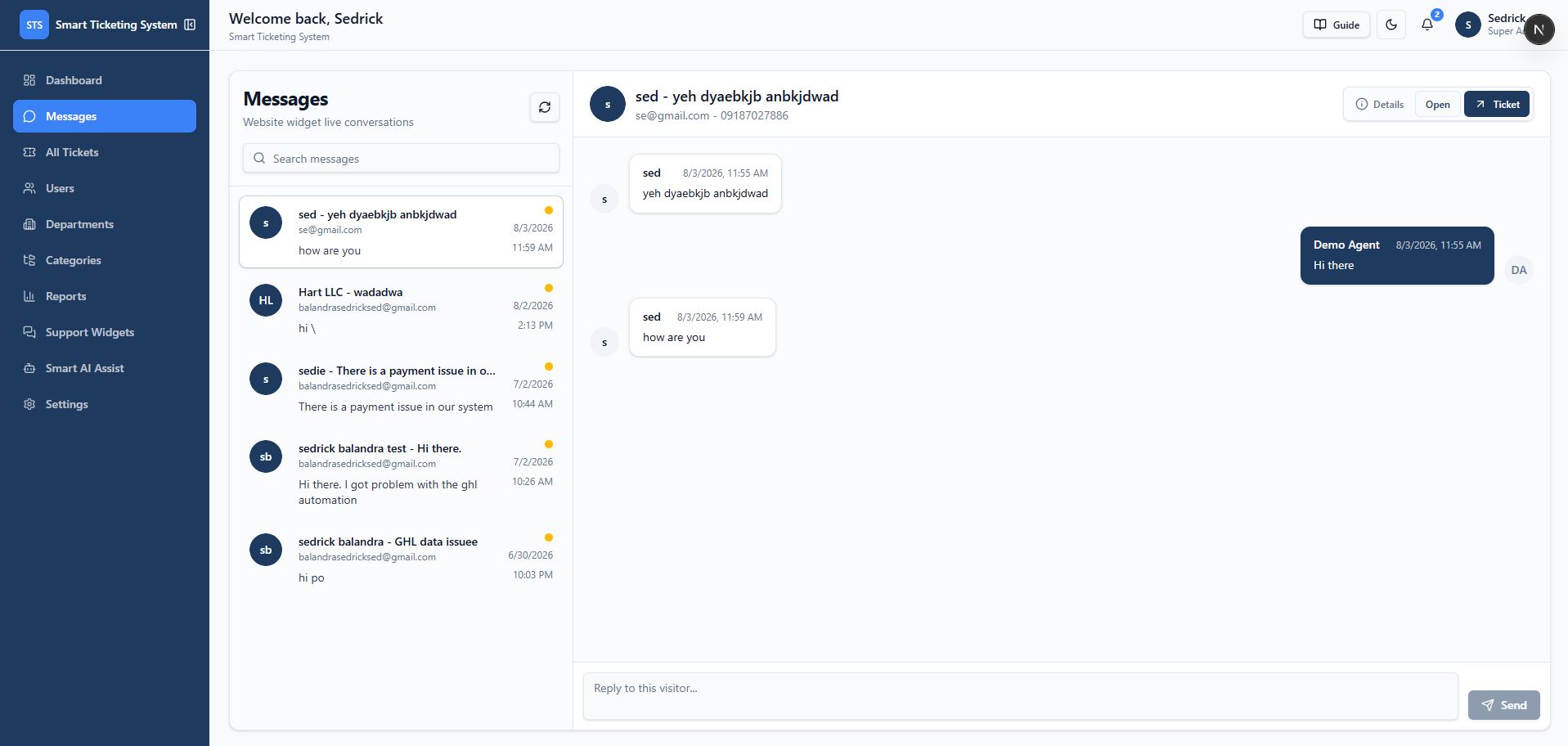
The system includes a dedicated internal Message Center for managing conversations that originate from the website live chat widget.

1
The conversation creates a support ticket
2
The visitor's messages appear in the internal Message Center
3
Support agents reply from the dashboard
4
Agent replies are reflected back to the visitor through the website widget
5
The full conversation remains connected to the ticket history
6
Staff receive notifications when new visitor messages arrive
Built an integrated website live chat and internal Message Center where customer conversations are automatically converted into support tickets, routed to staff, and managed through a connected two-way messaging workflow.
Key Capabilities

15 connected capability areas

Click any card to expand the full detail.

1. Customer Support Ticketing
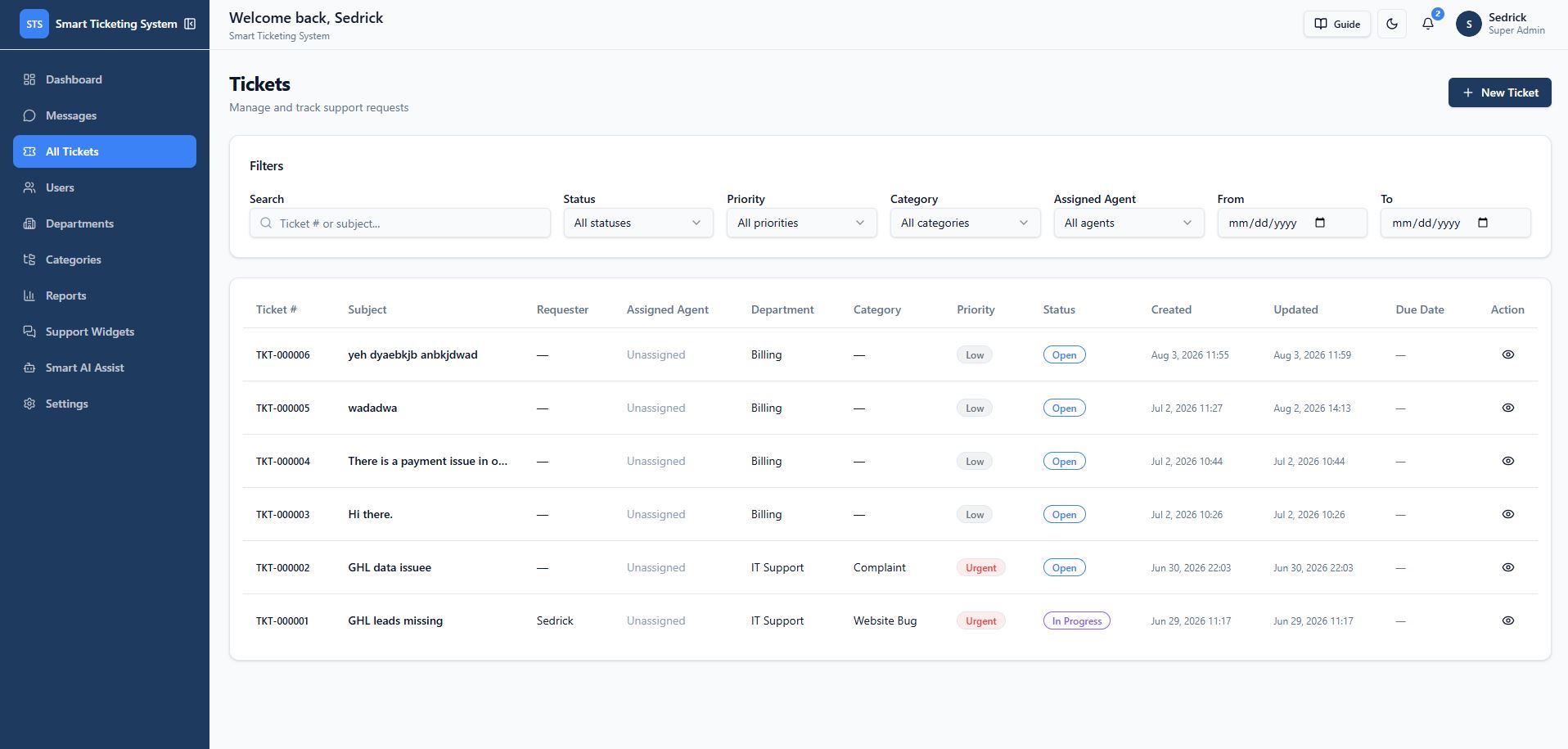
  • Create support tickets with subject, description, department, category, and priority.
  • Generate unique ticket numbers such as TKT-000001.
  • Track ticket status from creation to completion.
  • Reply to customers through ticket conversations.
  • Reopen resolved or closed tickets.
  • Close tickets after resolution.
  • View requester contact information.
  • Track ticket source, including internal dashboard and website widget submissions.
  • Upload and download private ticket attachments.
  • Maintain a complete ticket history.
2. Ticket Lifecycle Management
  • 1. Ticket created
  • 2. Ticket categorized and prioritized
  • 3. Ticket assigned to an agent
  • 4. Agent responds
  • 5. Ticket updated or escalated
  • 6. Ticket resolved
  • 7. Ticket closed
  • 8. Ticket reopened when additional support is required
  • Every major action is recorded in the ticket activity timeline.
3. SLA Tracking
  • Support teams can define response and resolution targets based on priority.
  • Low priority: 24-hour response, 5-day resolution.
  • Medium priority: 12-hour response, 3-day resolution.
  • High priority: 4-hour response, 1-day resolution.
  • Urgent priority: 1-hour response, 8-hour resolution.
  • Tracks response deadline, resolution deadline, first response time, resolved time, and closed time.
  • Tracks overdue tickets and tickets due today.
  • SLA performance reporting.
4. Role-Based Access Control
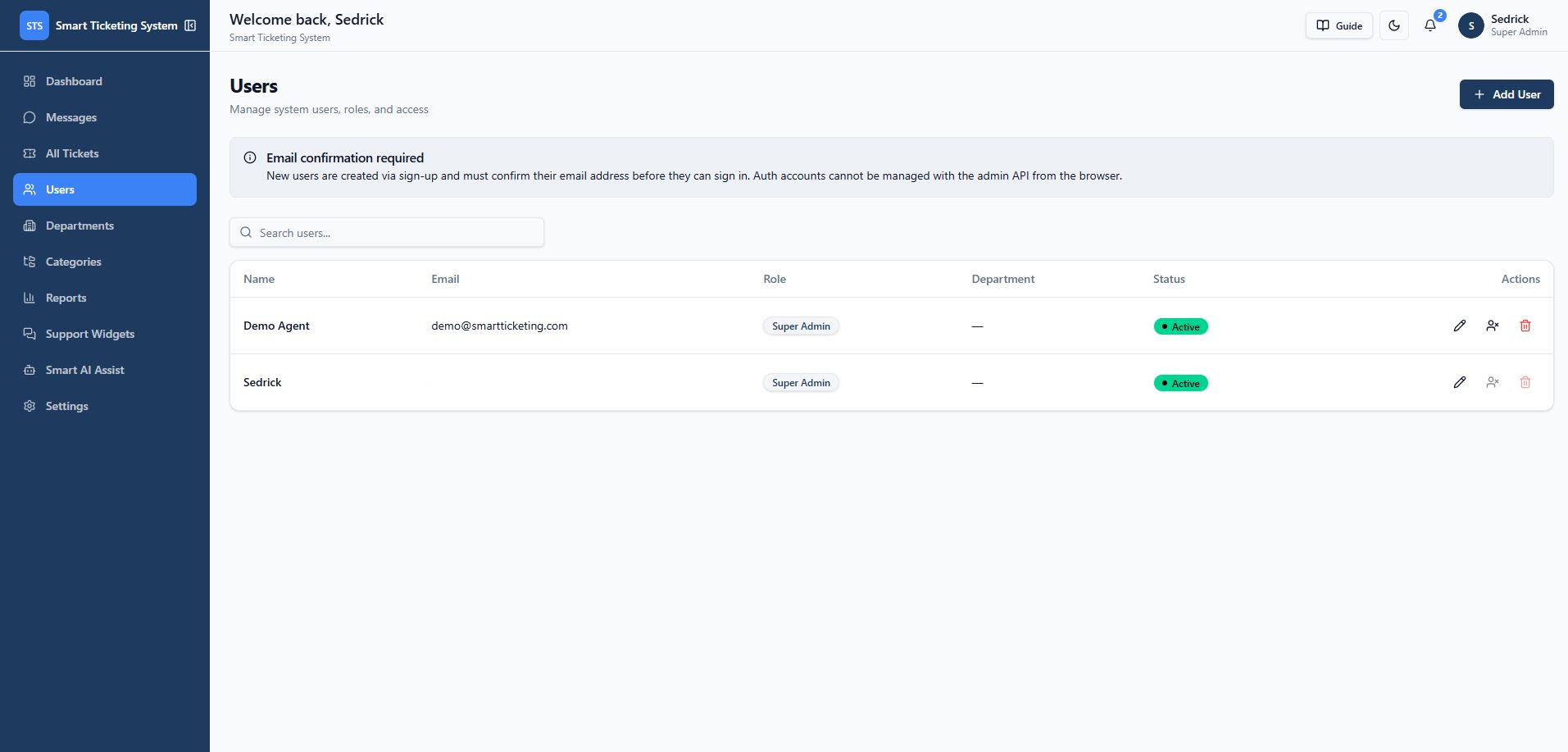
  • Four roles: Super Admin, Admin, Agent, and Client — each with its own dashboard and permission scope.
  • Super Admins manage users, settings, workflows, SLA rules, AI configuration, and system-wide data.
  • Admins manage tickets, departments, categories, agents, and reports.
  • Agents view assigned work, respond to customers, update ticket statuses, add internal notes, and manage attachments.
  • Clients create tickets, view their own requests, reply to support staff, and upload files.
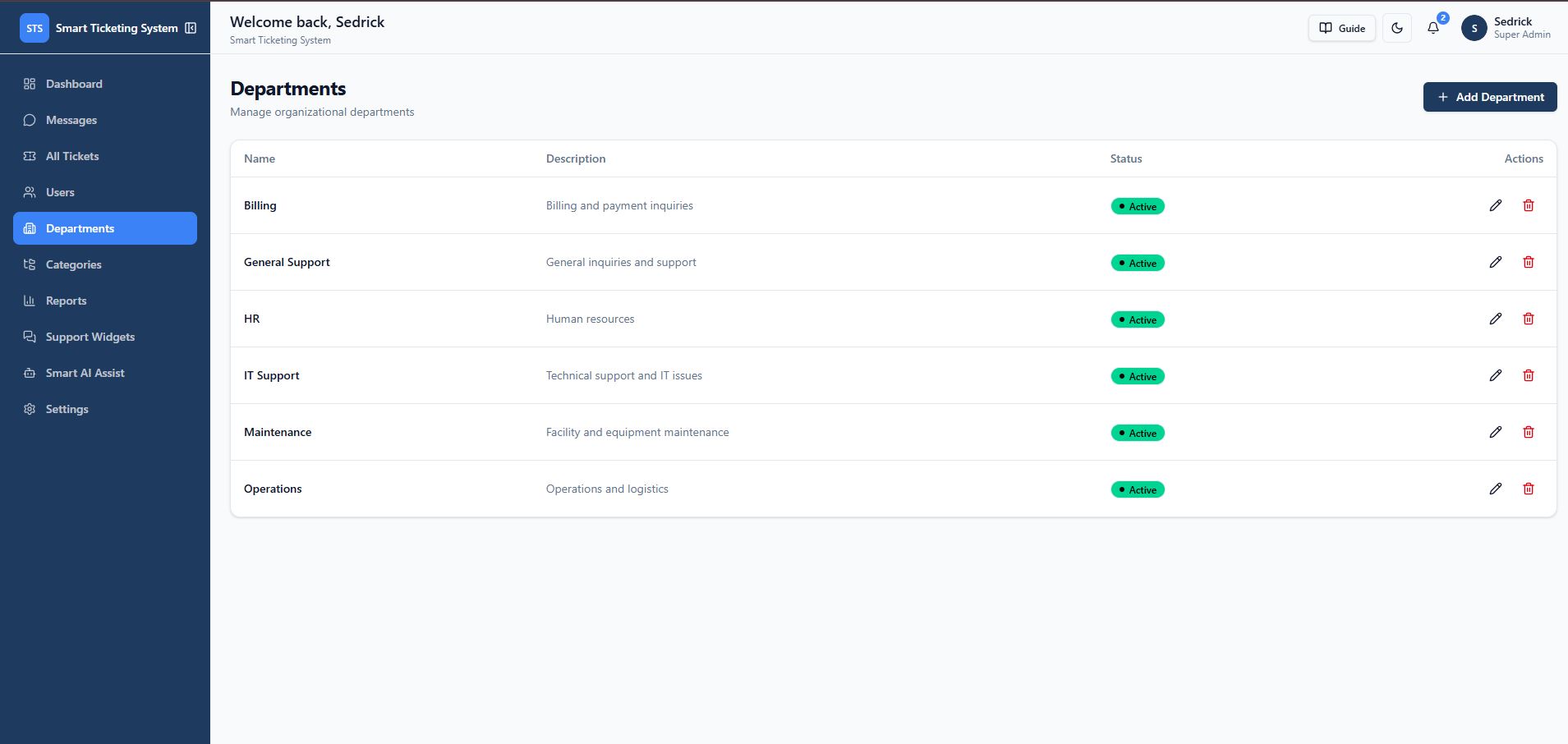
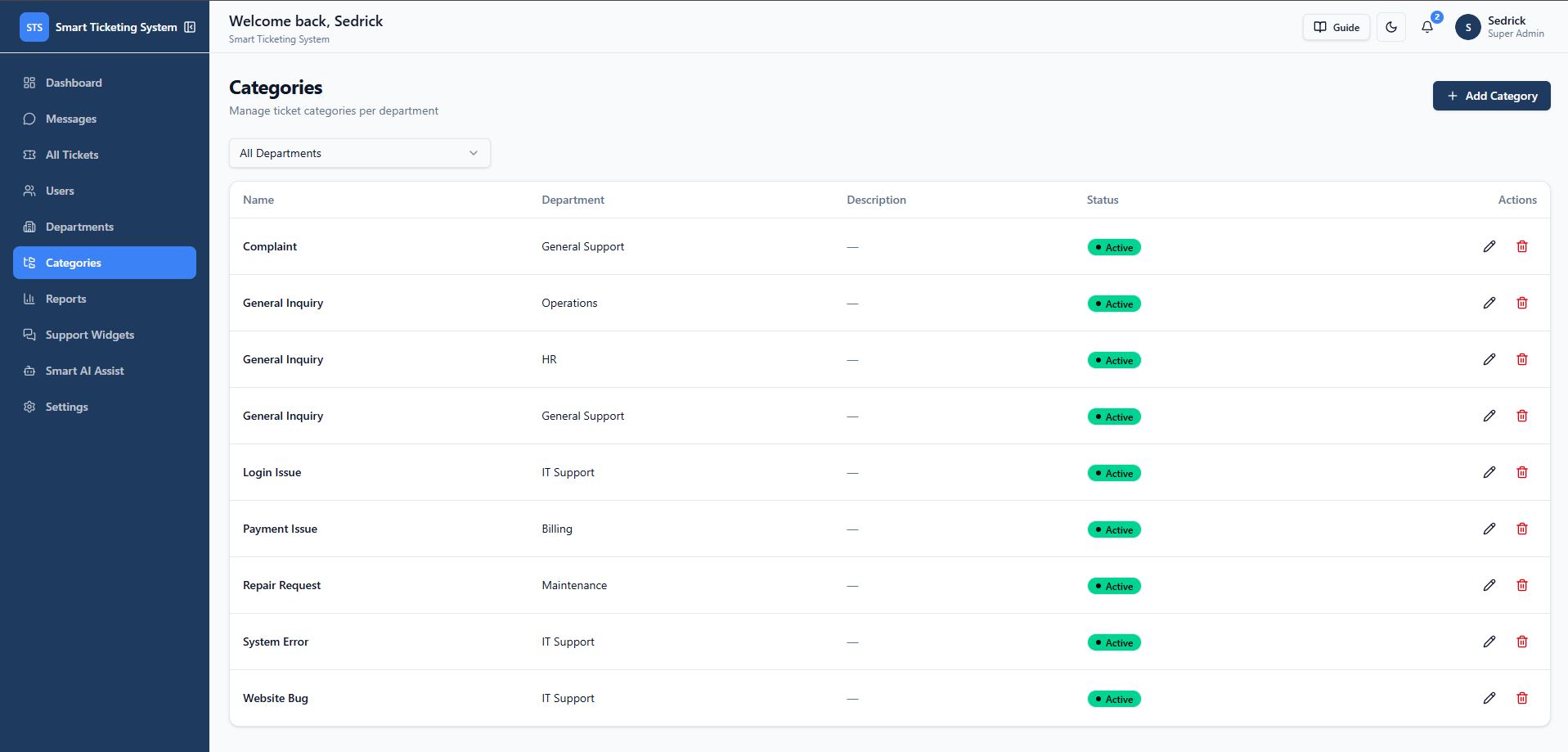
5. Department and Category Management
  • Organize support operations by department, category, ticket status, ticket priority, and assigned agent.
  • Suitable for companies with multiple teams — technical support, billing, onboarding, sales, operations, or customer success.
6. Assignment and Workload Management
  • Assign tickets to specific agents.
  • Unassign tickets.
  • View tickets assigned to them.
  • Filter by assigned agent.
  • Monitor agent workload.
  • Receive notifications when tickets are assigned.
  • Track unassigned requests that need attention.
7. Internal Collaboration
  • Staff-only internal notes.
  • Private investigation details.
  • Internal replies.
  • Suggested next actions.
  • AI-generated notes that require human review.
  • Activity history for auditing.
  • Support staff can collaborate privately inside a ticket without exposing internal communication to customers.
8. Website Support Widget
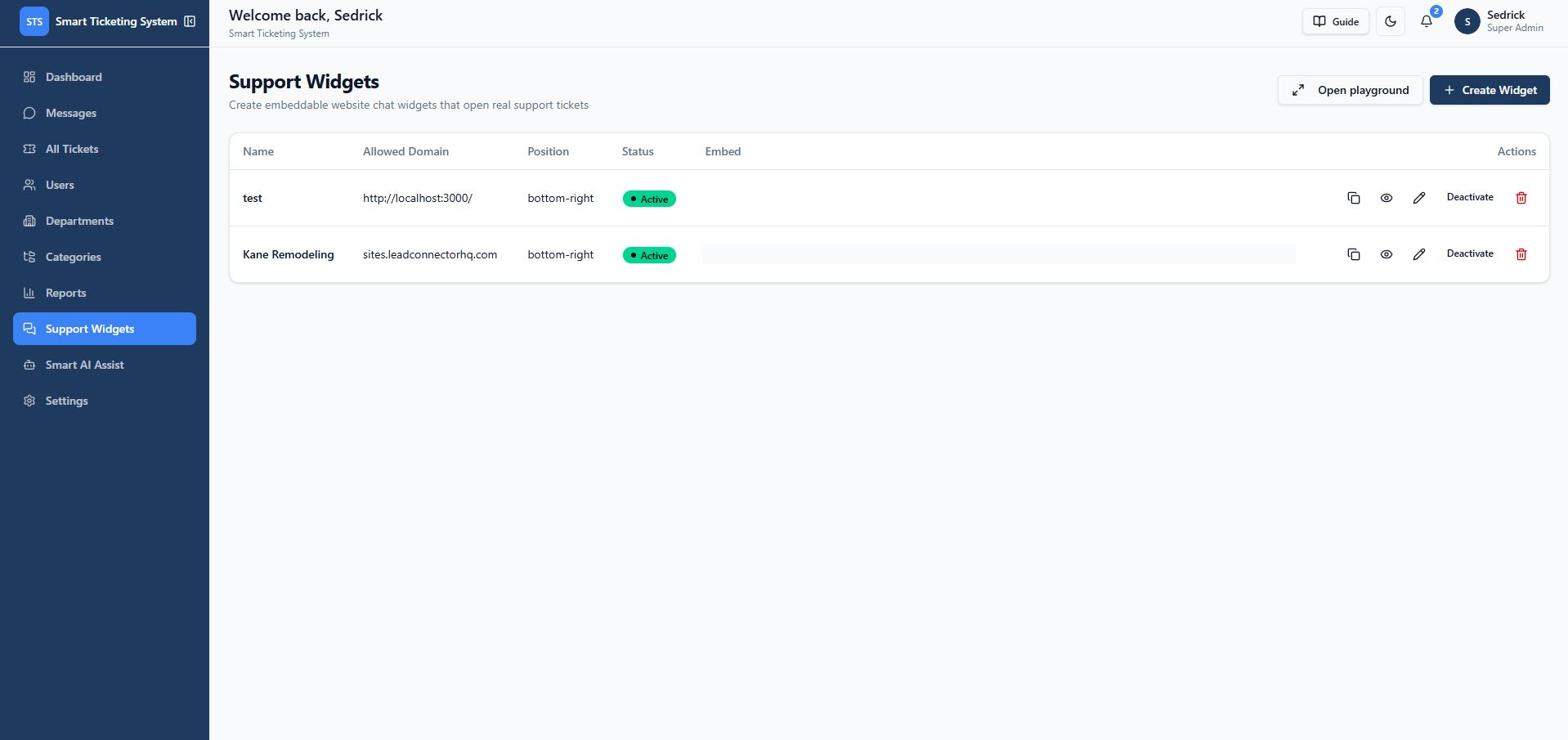
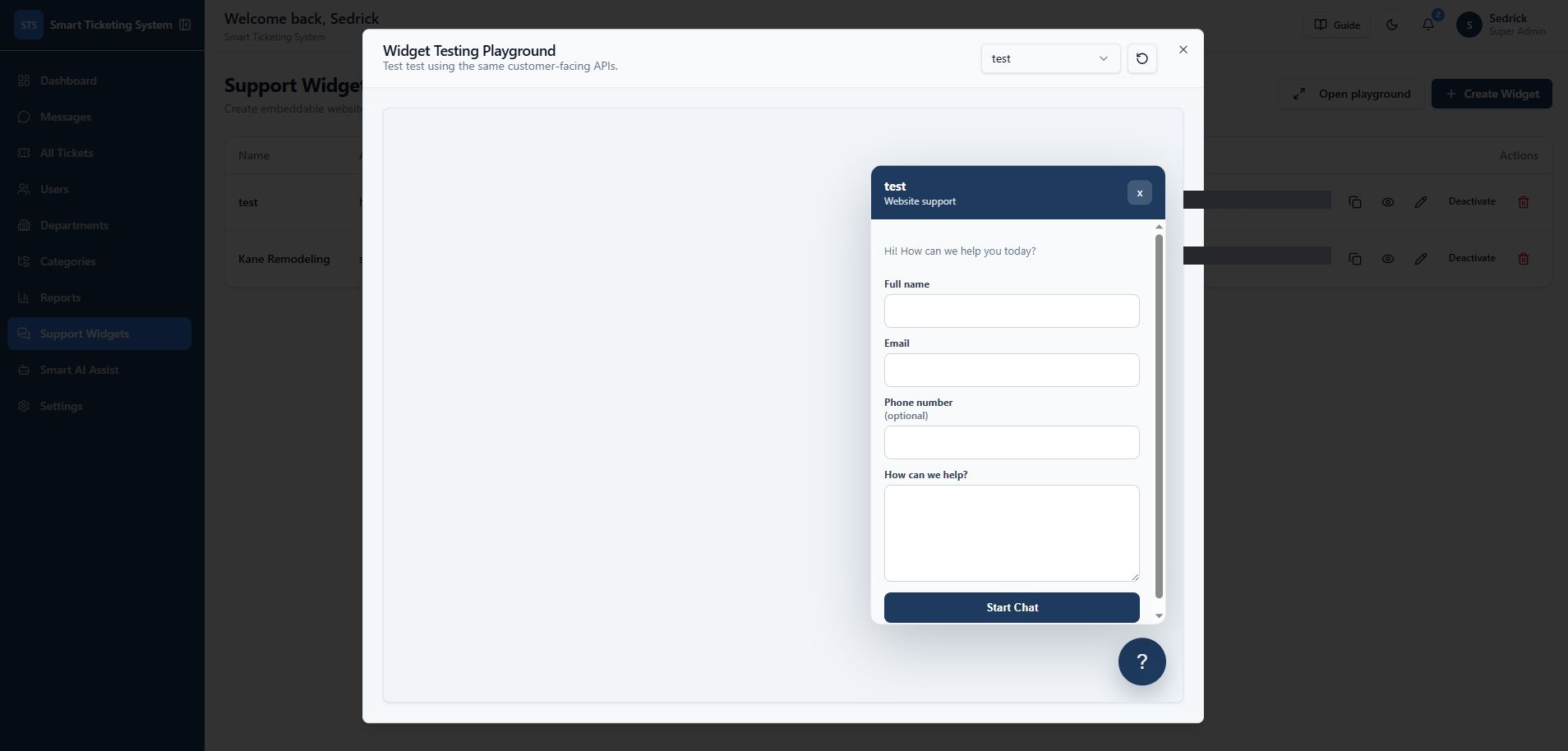
  • A company can add a small JavaScript snippet to its website and provide customers with an integrated support experience without logging into the main application.
  • Customer ticket submission with name, email, and optional phone collection.
  • File attachments.
  • Custom welcome message and offline message.
  • Custom brand color and bottom-left or bottom-right positioning.
  • Optional widget logo or avatar.
  • Website/domain restrictions.
  • Default department, category, and priority routing.
  • Live chat mode.
  • Mobile-friendly layout.
  • Widget preview before publishing.
  • Copyable embed code.
  • Each widget submission creates a real support ticket inside the central system.
9. Live Website Chat
  • After a visitor creates a ticket through the widget, the system creates a chat session linked to that ticket.
  • Customers can continue the conversation from the website and receive replies from support agents.
  • View conversation history and send additional messages without creating duplicate tickets.
  • Support agents manage website conversations from the internal message center.
  • Configurable inactivity expiration for widget chat sessions.
10. Message Center
  • Dedicated internal workspace for conversations originating from the website live chat widget.
  • Visitor messages appear in the internal Message Center in real time.
  • Agent replies sent from the dashboard are reflected back to the visitor through the widget.
  • The full conversation stays connected to the underlying ticket history.
  • Staff notifications on new visitor messages.
  • Creates a complete two-way communication flow between the customer-facing website chat and the internal support team.
11. Customer Source Tracking
  • Preserves visitor origin, the page URL where the request was submitted, and the referrer URL.
  • Captures user agent and website widget identity.
  • Helps support teams understand where customer issues originate and adds context when investigating requests.
12. Notifications
  • New ticket created.
  • New customer reply.
  • Agent assignment.
  • Status changes.
  • Website chat messages.
  • Ticket updates.
  • Notifications are linked to the relevant ticket so staff can quickly open the correct conversation.
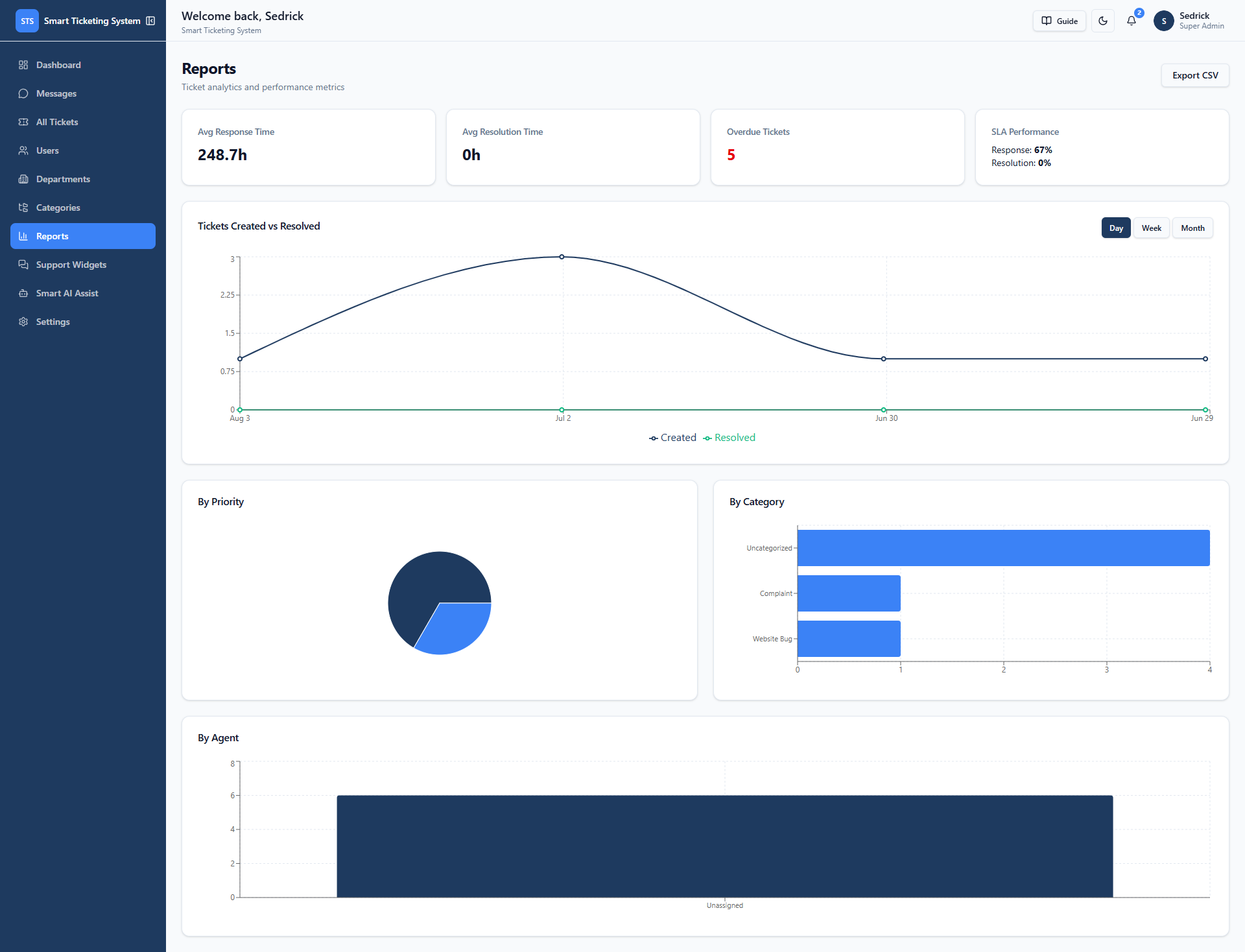
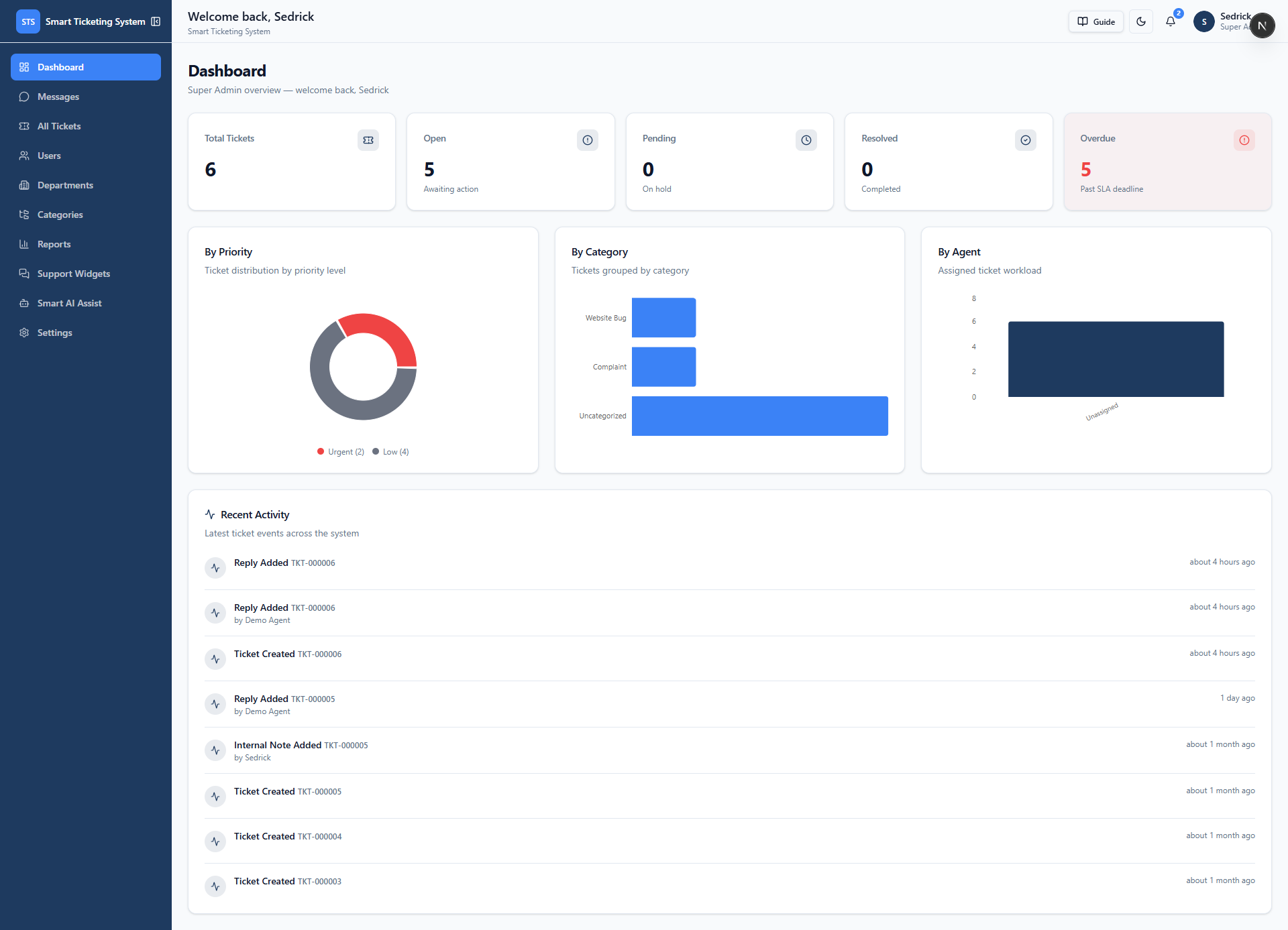
13. Reporting and Analytics
  • Ticket volume over time.
  • Tickets by status, priority, category, and department.
  • Agent workload.
  • Resolution performance and SLA performance.
  • Overdue ticket counts.
  • Recent ticket activity.
  • Reports can be exported to CSV for further analysis, management reporting, or external BI workflows.
14. Configurable Workflows
  • Ticket statuses, priority levels, status colors, priority colors, and sorting order.
  • SLA response hours and SLA resolution hours.
  • Notification preferences.
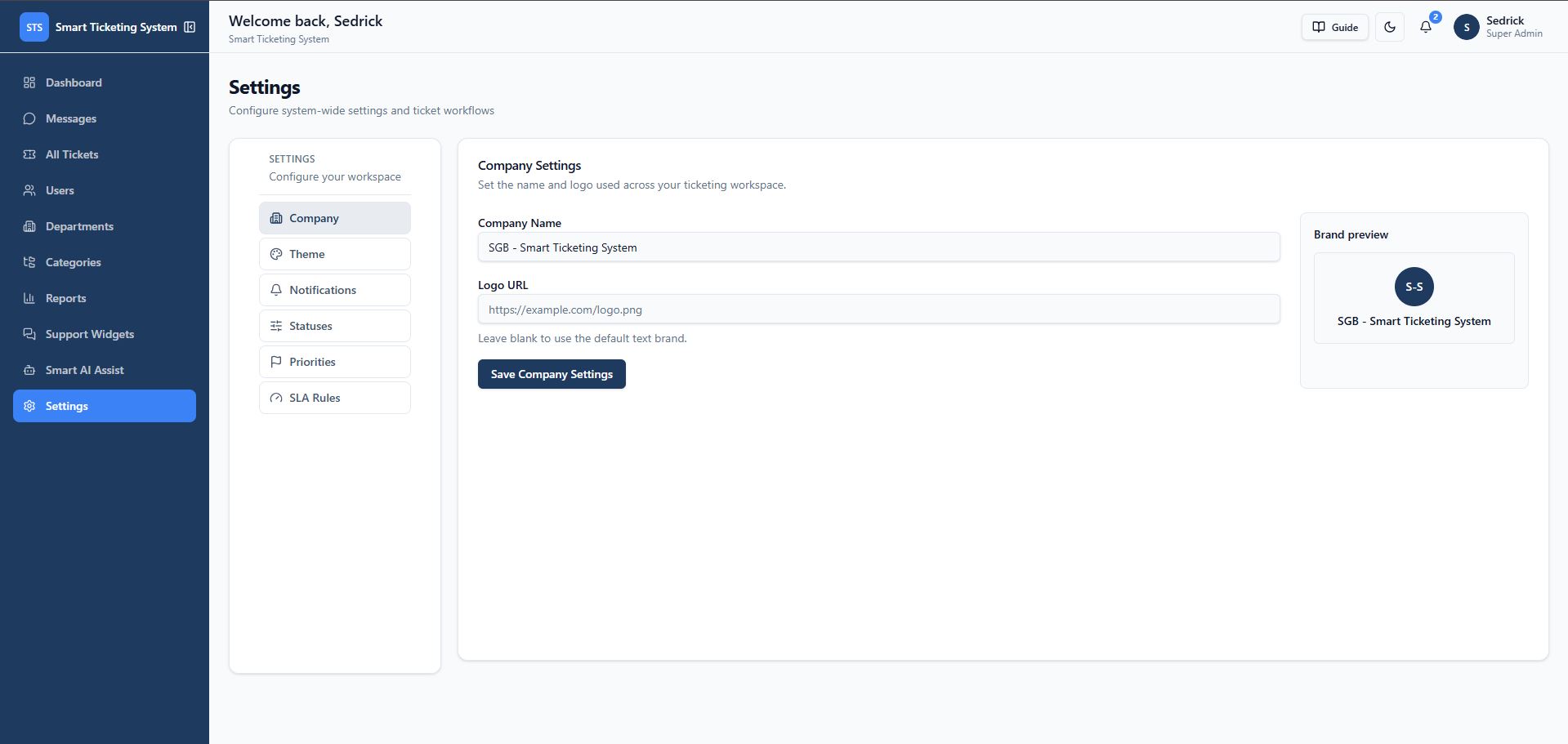
  • Company branding — logo, primary color, accent color, and theme settings.
  • Makes the platform adaptable to different support models instead of forcing every company to follow the same workflow.
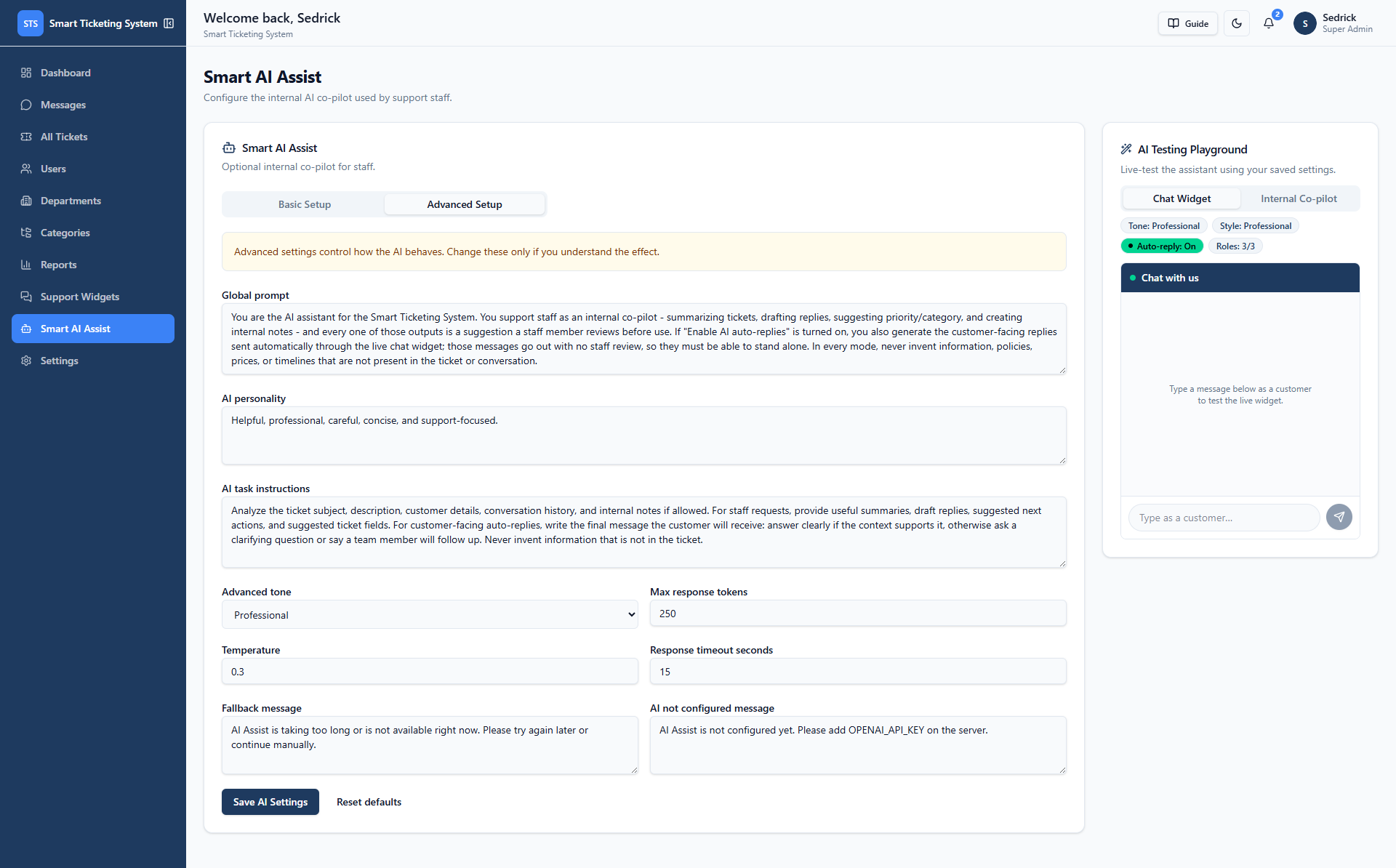
15. Internal AI Support Assistant
  • Summarize a ticket, draft a customer reply, or improve an existing reply.
  • Suggest category and priority, and recommend the next action.
  • Explain the reported issue and create a professional response.
  • Generate an internal note or answer custom questions about a ticket.
  • AI output is presented as a draft for staff review — it does not automatically send messages to customers.
  • Configurable: AI enablement, staff access, tone, reply style, AI personality, global prompt, task instructions.
  • Configurable: maximum response length, temperature, response timeout, and fallback messages.
  • Configurable: internal-note context access, field suggestion access, and internal-note saving permissions.
  • Customer-facing AI auto-replies are controlled separately from internal AI Assist and are disabled by default, requiring explicit opt-in.
  • Provides AI-assisted productivity while preserving human approval and operational control.
Security & Data Protection

Built on Supabase Auth and Row Level Security

Clients can only access their own tickets, while agents and administrators receive access based on their assigned roles.

Technical Architecture

Built on

Frontend
  • Next.js 16 App Router
  • React 19
  • TypeScript
  • Tailwind CSS v4
  • Responsive desktop, tablet, and mobile layouts
  • Reusable UI components
  • Dark mode support
  • Recharts analytics visualizations
  • Lucide icons
Backend
  • Supabase PostgreSQL
  • Supabase Auth
  • Supabase Storage
  • Supabase Realtime
  • Database functions and RPCs
  • Row Level Security policies
  • Server-side API routes
  • Protected administrative operations
API & Integrations
  • Widget configuration API
  • Widget ticket creation API
  • Widget messaging API
  • Widget conversation history API
  • AI ticket-assistance API
  • Public branding/settings API
  • OpenAI Responses API integration
Why This Fits a Smart Ticketing Company

A foundation for support-driven products

SaaS help desk productsIT support companiesCustomer service teams Internal employee service desksWebsite support platformsTechnical support portals Managed service providersB2B customer success teamsMulti-department support operations AI-assisted customer support products

Its most commercially valuable capability is the connection between the public website widget and the internal ticket workspace. A company can capture a visitor's request directly from its website, preserve the visitor's context, route the request to the correct team, and continue the conversation through a structured support workflow.

Portfolio Summary

What this project demonstrates

A full-stack smart ticketing and customer support platform with role-based access control, SLA tracking, real-time notifications, private internal collaboration, analytics, CSV reporting, secure attachments, embeddable website support widgets, live customer chat, and an optional human-reviewed AI support assistant.

Built an integrated website live chat and internal Message Center where customer conversations are automatically converted into support tickets, routed to staff, and managed through a connected two-way messaging workflow.

Gallery

Screens & workflows
Comments

Have thoughts on this project?

Leave a public comment — questions, feedback, or your own experience with a similar system.

Loading comments…

Need a support desk connected to your website?

I can build a ticketing platform with SLA tracking, role-based access, an embeddable chat widget, and an AI-assisted support workflow — built around your team's process.

Work With Me →