FreelancerOS

An AI-powered financial operating system for freelancers, consultants, remote workers, and small service businesses — combining income tracking, expense management, AI receipt scanning, invoicing, tax estimation, financial reports, client management, and AI-powered insights in one workspace.

Financial SaaSAI OCRMulti-TenantTax PlanningInvoicing
Self-Initiated SaaS BuildClient
Financial SaaS / Freelance ToolsIndustry
[Timeline]Duration
React · Vite · SupabasePlatform
Overview

One financial command center instead of five tools.

Freelancers often manage their finances across spreadsheets, banking apps, receipt folders, invoicing tools, and tax documents. This creates disconnected data, missed deductions, unclear profitability, and unnecessary administrative work. FreelancerOS brings those workflows together in one financial command center — clients, income, expenses, receipts, invoices, taxes, reports, and AI insights, all in the same workspace.

Challenge

Freelancers often rely on disconnected spreadsheets, receipt folders, invoicing tools, and tax calculators. This makes it difficult to understand profitability, prepare tax information, and maintain consistent financial records.

Solution

I developed FreelancerOS, a full-stack SaaS platform that combines income tracking, client management, expense management, AI receipt processing, invoice generation, tax planning, reporting, and financial insights in one responsive workspace.

Result

A centralized financial operating system that reduces manual administration and gives freelancers a clearer view of revenue, expenses, tax obligations, clients, and business performance.

How much did I earn this month?How much did I spend?What is my current profit? How much should I reserve for taxes?Which expenses are increasing?Which invoices are still outstanding?
Core Features

15 connected capability areas

Click any card to expand the full detail.

1. Financial Dashboard
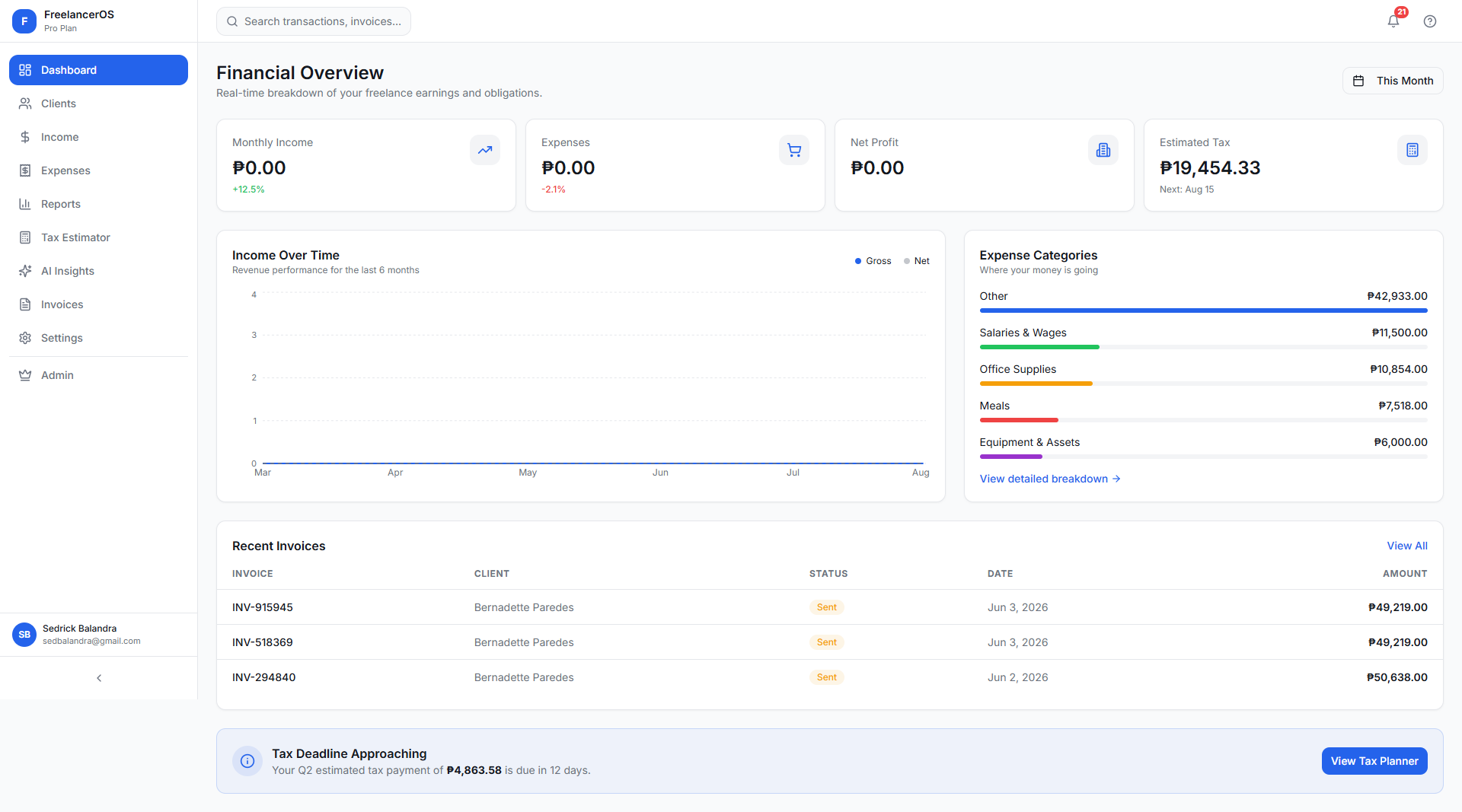
  • Monthly income, monthly expenses, estimated profit, and estimated tax liability.
  • Client count and expense category breakdown.
  • Income trends and recent income activity.
  • Recent invoices and upcoming tax deadlines.
  • Designed to answer key business questions at a glance — earnings, spend, profit, tax reserve, rising expenses, and outstanding invoices.
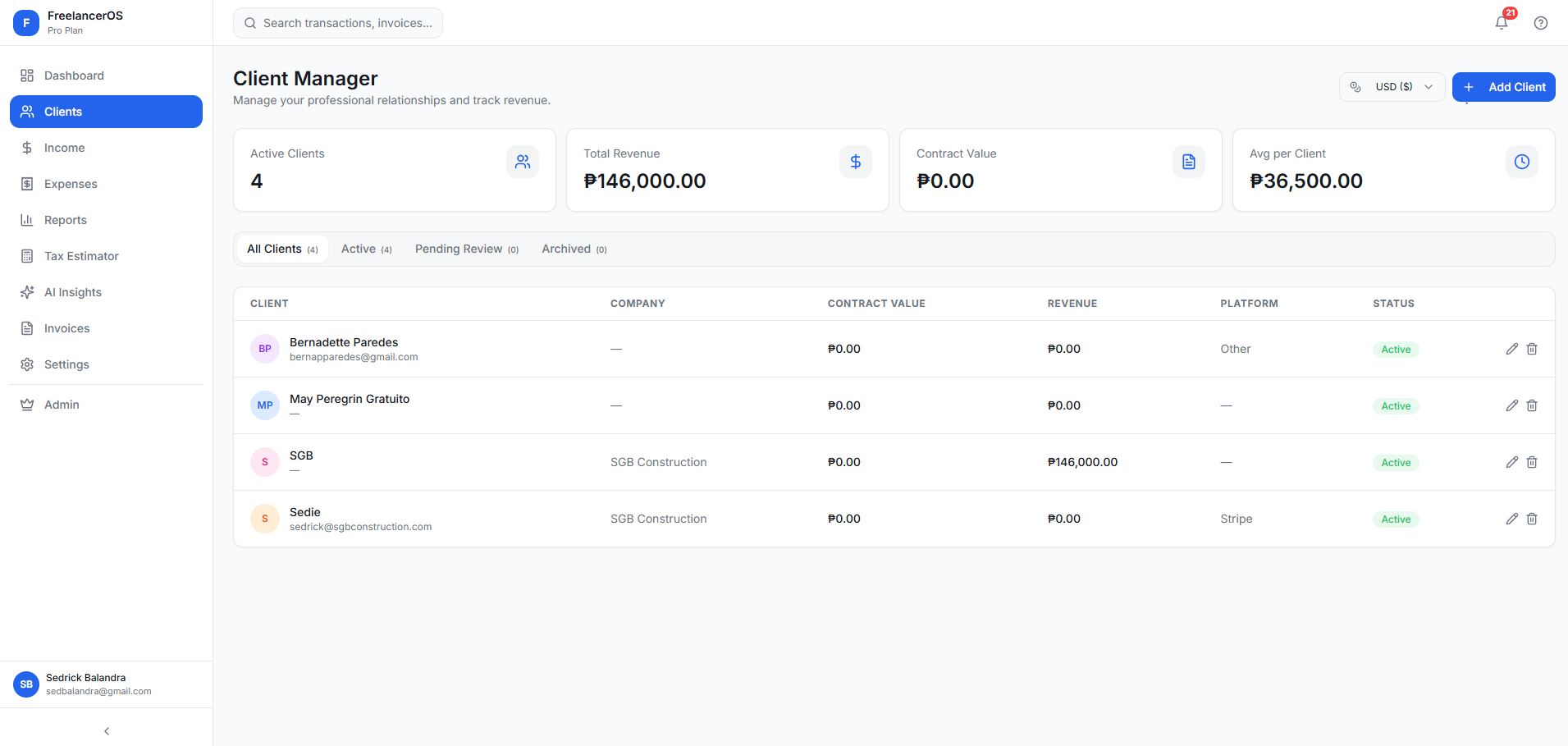
2. Client Management
  • Complete client directory with company name, email, contract value, payment platform, notes, and status.
  • Dedicated client detail view: total revenue generated, paid and pending income, linked invoices, payment history, and revenue activity over time.
  • Useful for freelancers, agencies, consultants, designers, developers, coaches, and other service-based businesses managing multiple customers.
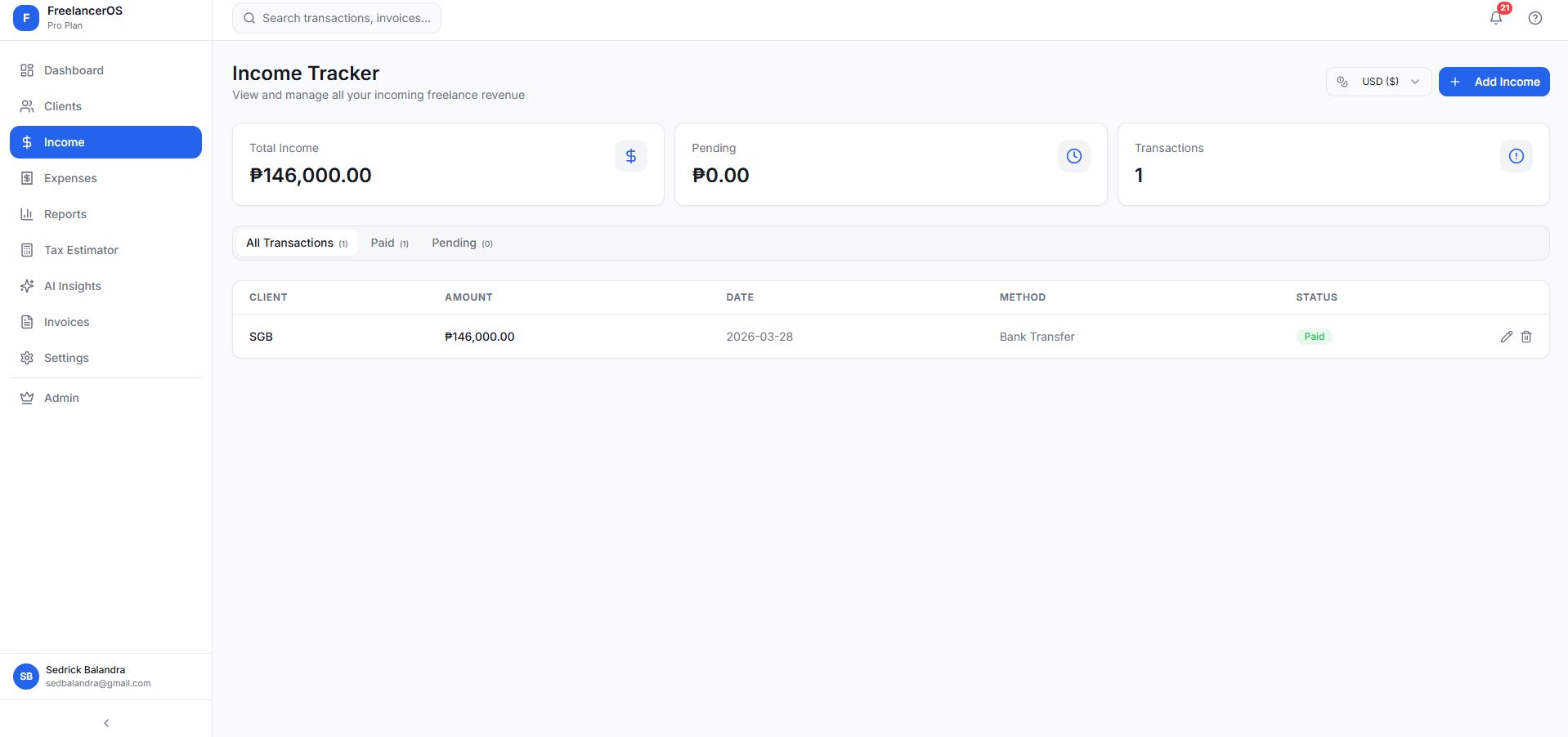
3. Income Tracking
  • Record payments by client, amount, original currency, payment method, status, date received, and notes.
  • Separates paid and pending income to show realized revenue vs. expected cash flow.
  • Monthly income totals and year-to-date income.
  • Income by client, payment history, currency conversion, and original-currency display.
  • Paid-versus-pending filtering.
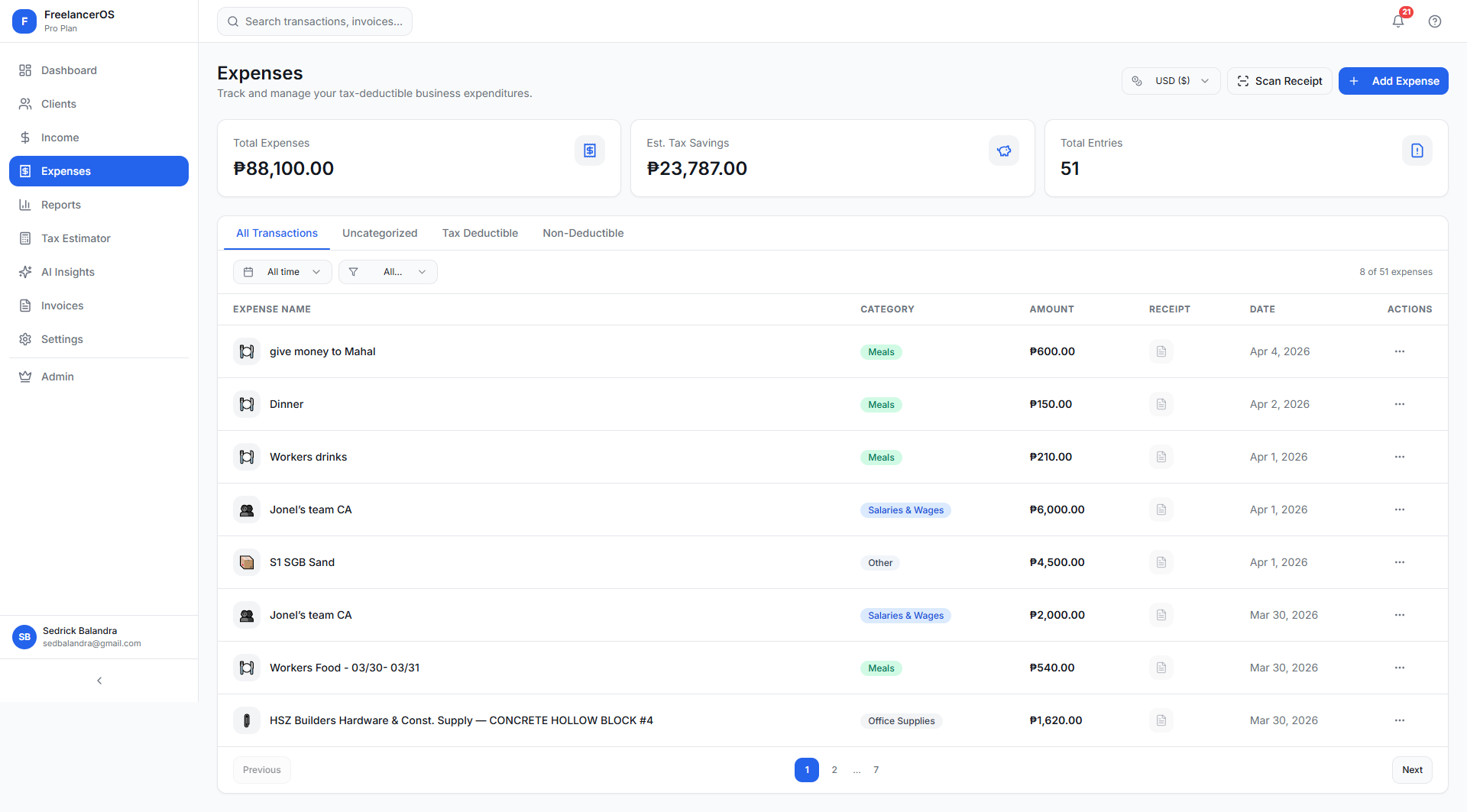
4. Expense Management
  • Expense records with name, category, amount, date, receipt, tax-deductible status, and notes.
  • Filter by all expenses, tax-deductible, non-deductible, date range, and category.
  • Built-in categories: software, subscriptions, office supplies, marketing, utilities, equipment, travel, professional services, meals, transportation, and other business costs.
  • Custom expense categories for specific business models.
5. AI Receipt Scanner
  • Upload a receipt image or capture one from a mobile device.
  • Extracts merchant name, receipt date, receipt number, total amount, and individual line items with quantity, unit price, and line total.
  • Suggests an expense category automatically.
  • Extracted items can be reviewed, corrected, and saved as expenses or a receipt record.
  • Especially valuable for traveling consultants, remote workers with recurring software expenses, small businesses with physical receipts, and anyone documenting deductions for tax time.
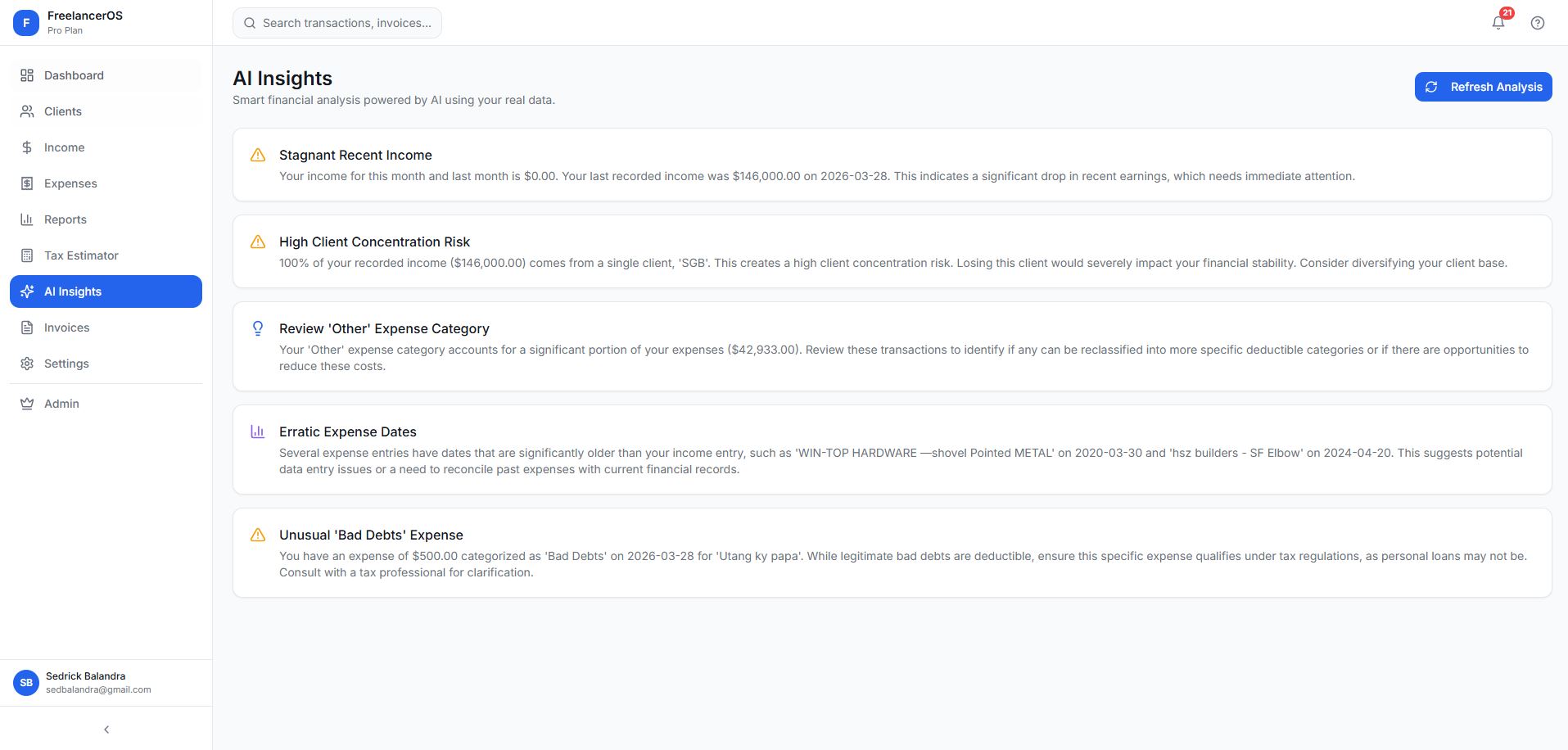
6. AI Financial Insights
  • Identifies month-over-month income changes, expense increases, and unusual spending patterns.
  • Flags potential duplicate expenses and high-cost expense categories.
  • Surfaces tax deduction opportunities and client concentration risk.
  • Analyzes cash-flow patterns and profitability trends.
  • Insights are generated from the user's actual workspace data rather than generic advice — e.g. "a large percentage of revenue depends on one client."
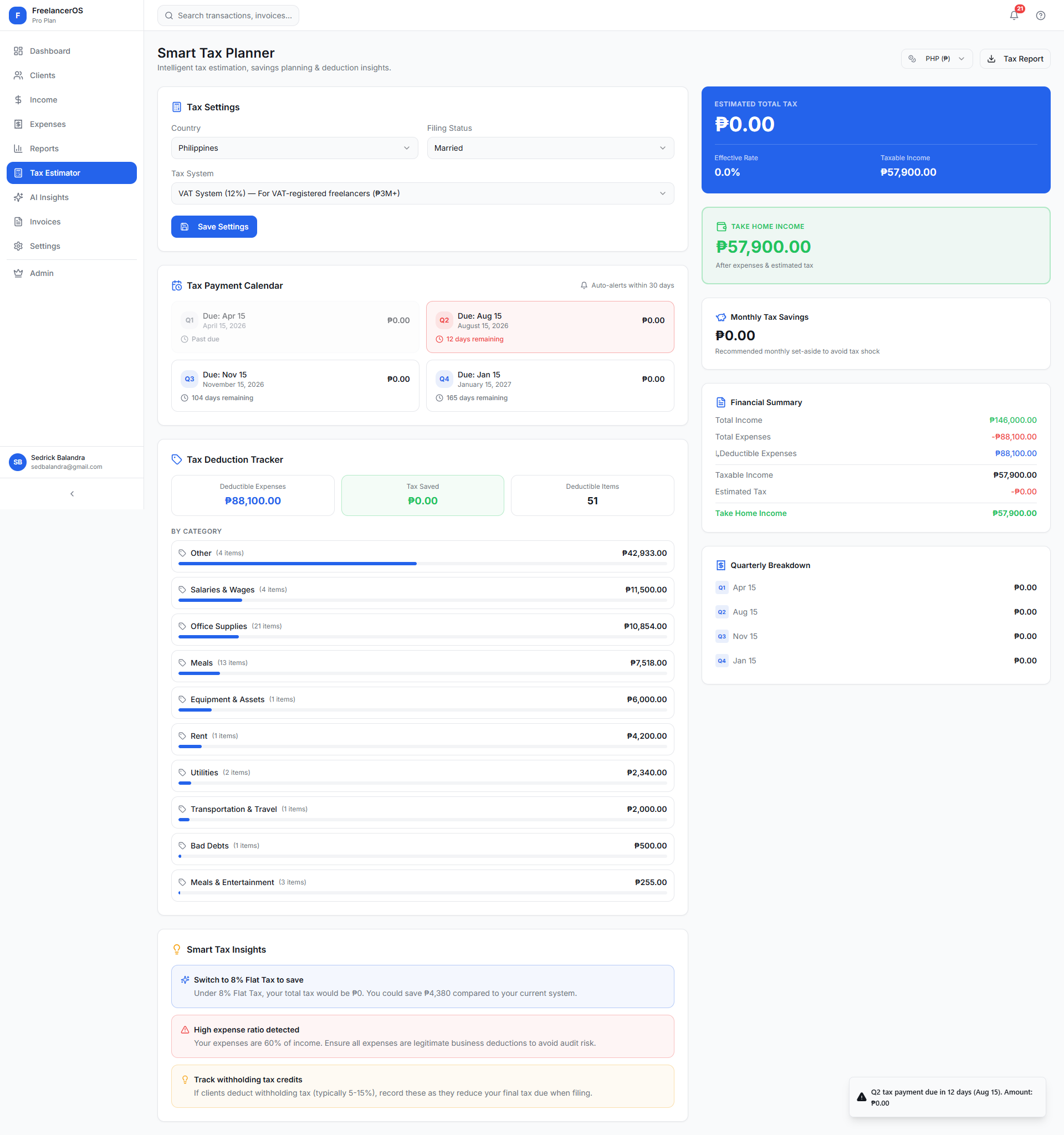
7. Smart Tax Planner
  • Estimates tax obligations using configurable country and tax-system rules.
  • Supported countries: Philippines, United States, United Kingdom, Canada, Australia, Japan, and Germany.
  • Calculates taxable income, estimated annual tax, quarterly tax amount, recommended monthly savings, effective tax rate, and estimated take-home income.
  • Deductible expense savings and upcoming tax deadlines.
  • Philippines workflow includes graduated income tax, 8% flat tax, Optional Standard Deduction, percentage tax reminders, VAT-threshold warnings, and quarterly filing reminders.
  • Users can generate a tax estimate report; the platform presents these as estimates and encourages consulting a qualified professional for filing decisions.
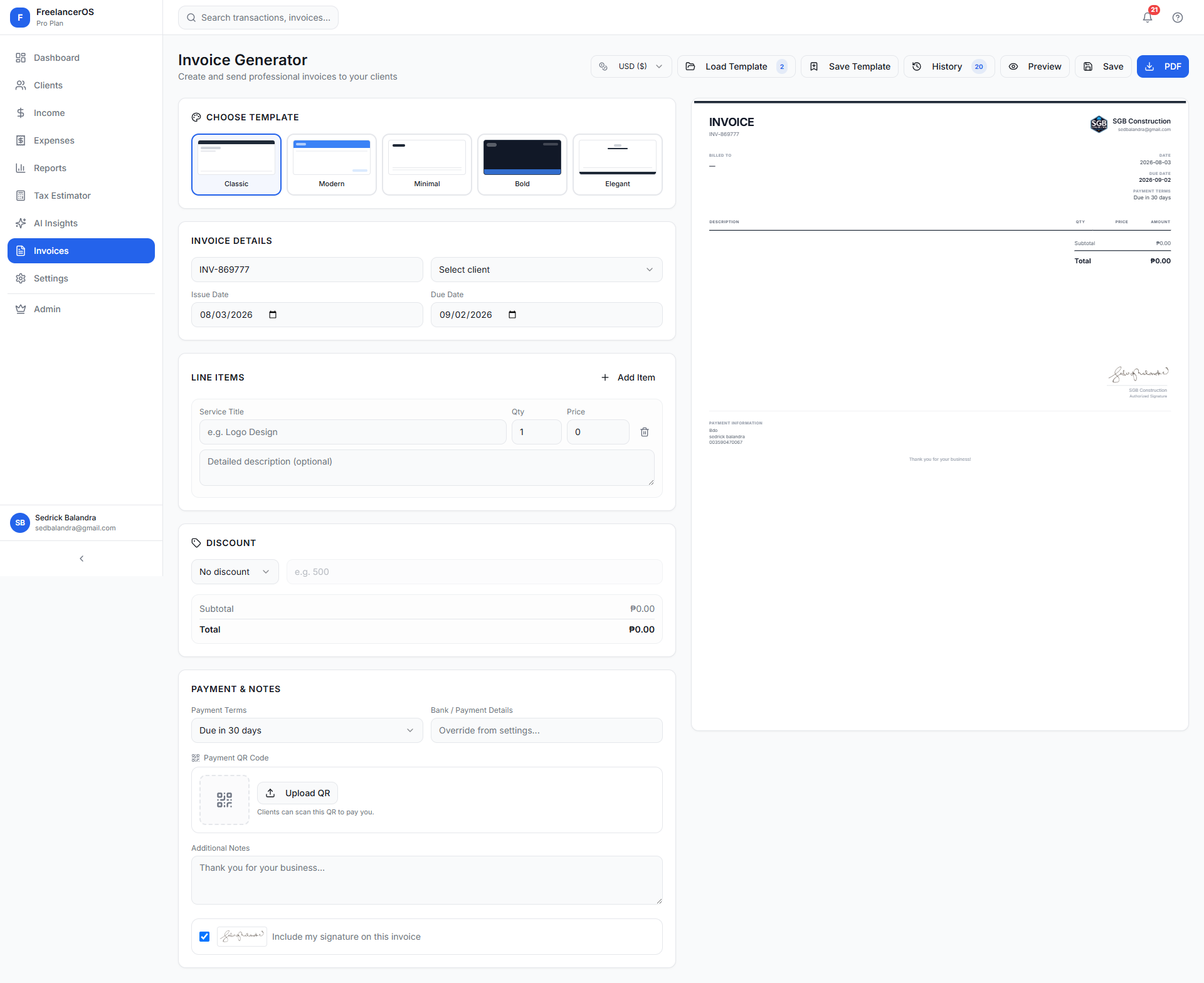
8. Invoice Generator
  • Invoice number, client details, issue date, due date, payment terms, line items, discounts, totals, notes, and payment instructions.
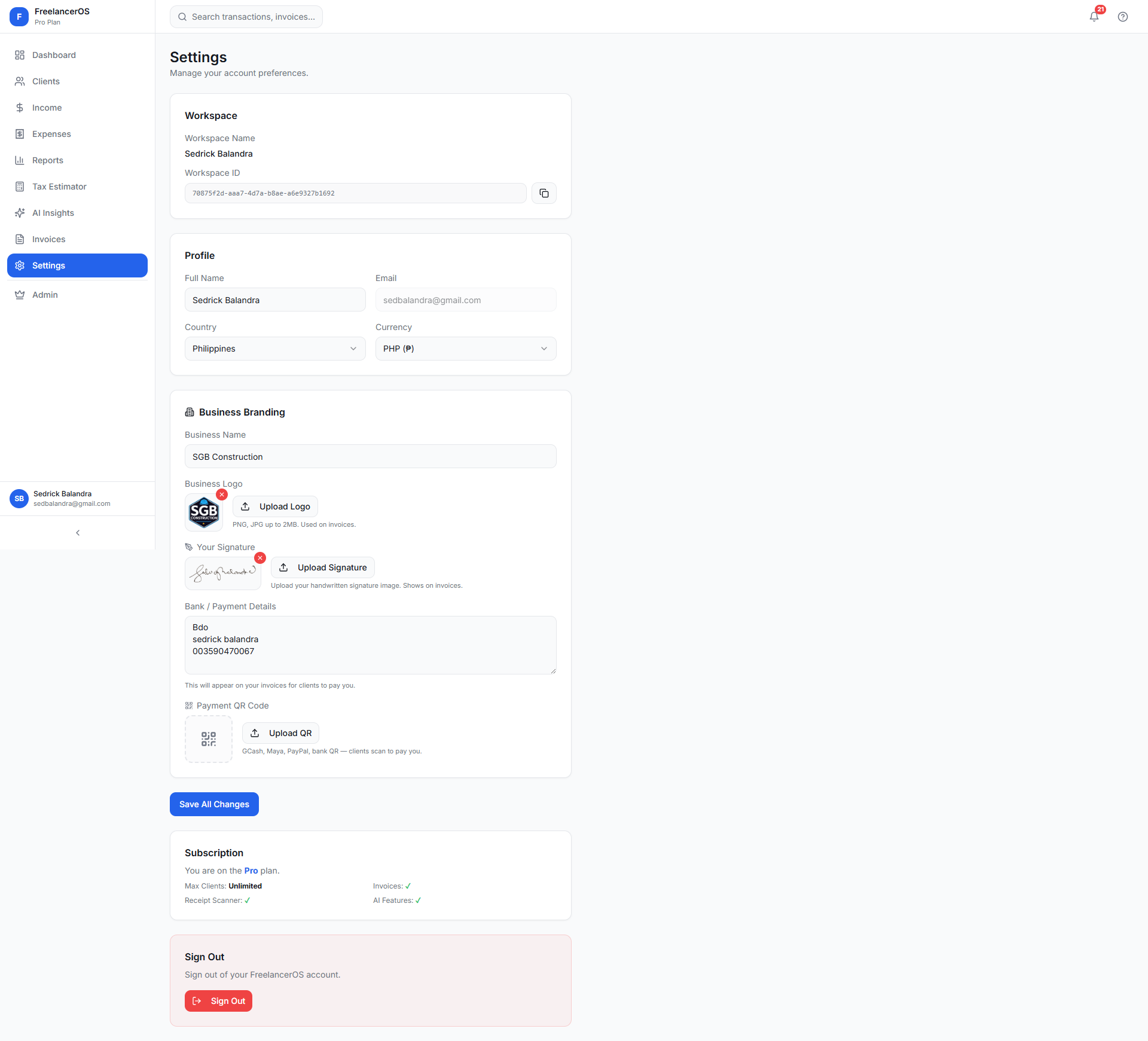
  • Bank details, payment QR code, business logo, and signature.
  • Multiple invoice designs: Classic, Minimal, Bold, and Elegant.
  • Preview, print, save, edit, and duplicate invoices.
  • Track invoice status and view invoice history.
  • Reusable invoice templates, reloadable for recurring clients.
  • Payment QR support for GCash, Maya, PayPal, or bank payment links.
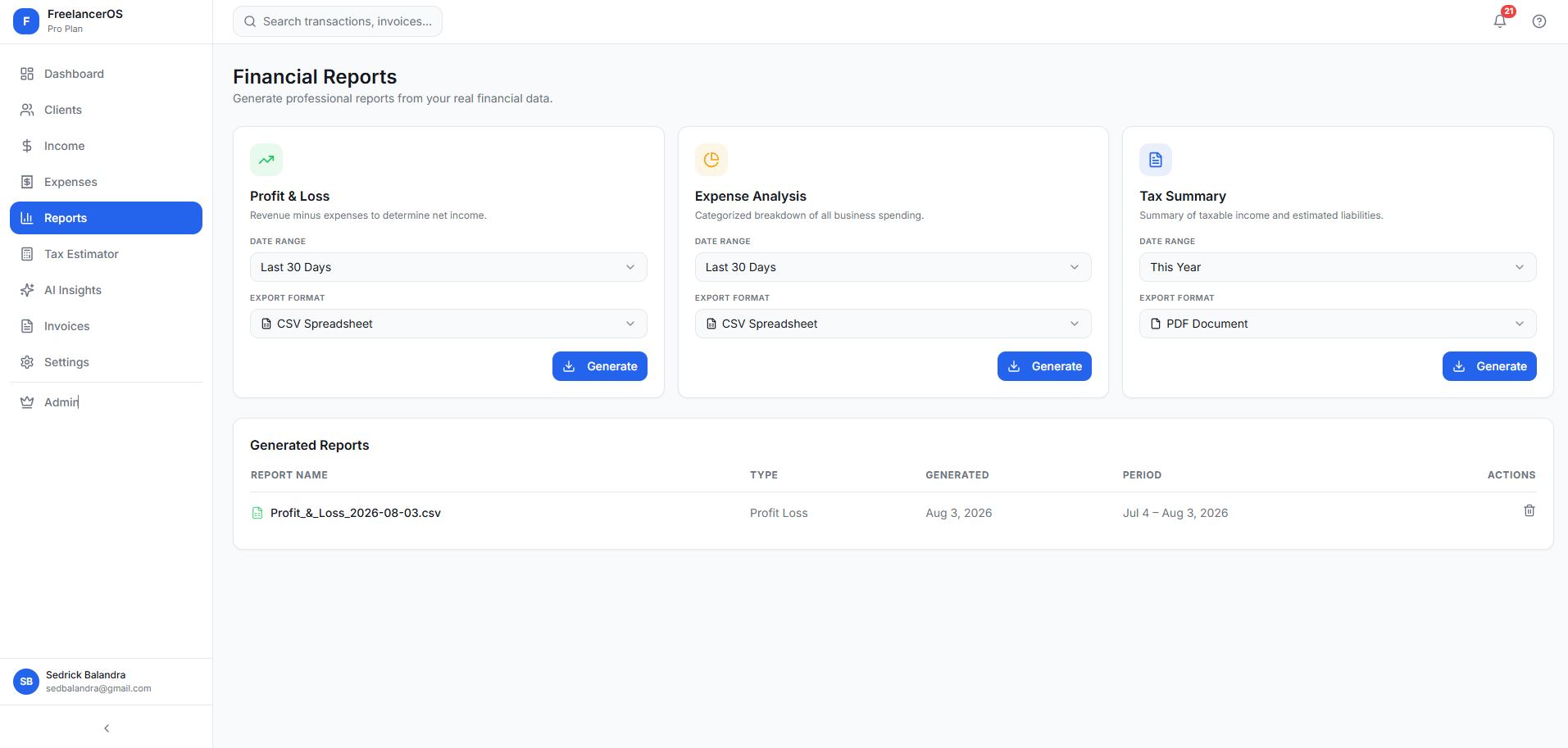
9. Financial Reports
  • Report types: Income Summary, Expense Summary, Profit and Loss, and Tax Summary.
  • Filterable by date range and exportable as PDF or CSV.
  • Generated reports are saved inside the workspace for later review or regeneration.
  • Useful for tax preparation, monthly business reviews, client profitability analysis, expense audits, financial planning, and sharing records with accountants.
10. Multi-Currency Support
  • Stores the original transaction currency and converts values into the user's base currency.
  • Displays exchange-rate-adjusted totals while preserving the original amount alongside the converted amount.
  • Allows users to temporarily override the display currency.
  • Suitable for international freelancers, remote workers, digital agencies, and consultants with clients in different countries.
11. Workspace-Based Multi-Tenancy
  • Each workspace has its own clients, income, expenses, invoices, receipts, tax settings, reports, subscription status, and usage tracking.
  • Workspace-level access control ensures users only access data belonging to their workspace.
  • Supports individual freelancers, small businesses, accounting agencies, teams managing multiple business accounts, SaaS subscription plans, and future collaboration features.
12. Subscription and Feature Gating
  • Subscription-aware feature control over invoice functionality, AI financial insights, receipt scanning, email-related features, client limits, and usage-based limits.
  • Creates a foundation for SaaS monetization through free, basic, pro, and agency plans.
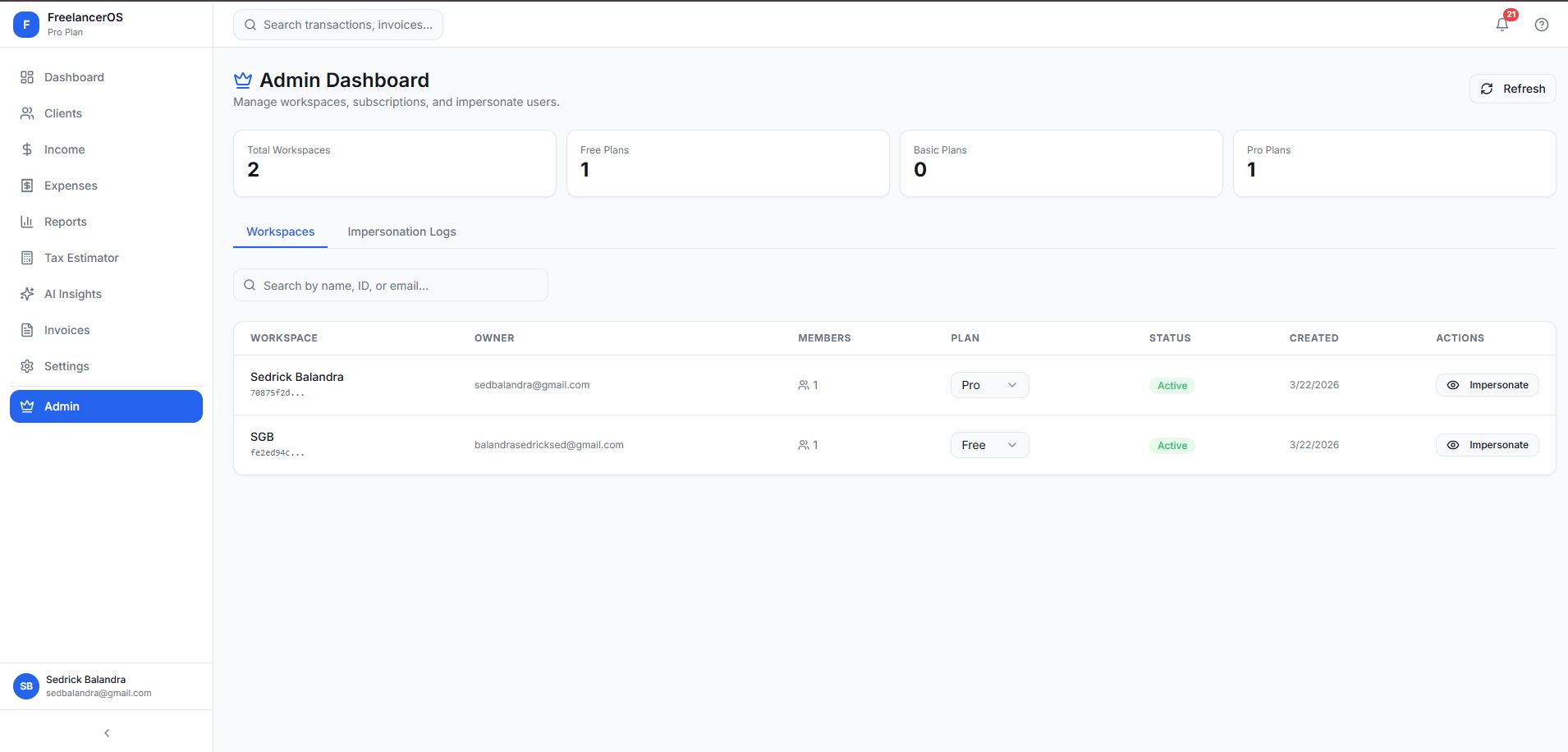
13. Administration Dashboard
  • Platform-level visibility for system owners.
  • View workspaces and search by workspace, user, email, or ID.
  • View workspace owners and review workspace members.
  • Monitor and change subscription plans, and review usage information.
  • Impersonate a workspace for support, with an impersonation history log providing an audit trail for administrative support activity.
14. Authentication and Account Security
  • Email and password authentication and Google sign-in.
  • Password reset, protected application routes, and session management.
  • Role-based administration, workspace-based data access, and row-level security policies.
  • Secure storage access rules.
  • Users can update name, business name, country, base currency, bank details, business logo, signature, and payment QR code.
15. Responsive Mobile Experience
  • Responsive dashboards and mobile navigation.
  • Quick access to clients, income, and expenses.
  • Receipt upload directly from mobile devices.
  • Responsive tables and cards, mobile-friendly dialogs, and collapsible navigation.
  • Safe-area-aware bottom navigation.
  • Lets freelancers record expenses immediately after a purchase instead of waiting until month-end.
Technical Implementation

Built on

Frontend
  • React
  • TypeScript
  • Vite
  • React Router
  • TanStack React Query
  • Tailwind CSS
  • shadcn/ui
  • Radix UI
  • Recharts
  • Framer Motion
  • Responsive component architecture
Backend & Data
  • Supabase
  • PostgreSQL
  • Supabase Auth
  • Supabase Edge Functions
  • Supabase Storage
  • Row-level security
  • Workspace-aware database policies
  • Usage tracking
  • Database triggers and RPC functions
AI & Automation
  • AI-powered receipt OCR
  • Structured receipt extraction
  • AI financial analysis
  • Duplicate expense detection
  • Tax and deduction recommendations
  • Exchange-rate retrieval and caching
  • Server-side AI gateway integration

A workspace-centric data model connects:

UsersProfilesWorkspacesWorkspace MembersClients Income RecordsExpensesReceiptsInvoicesInvoice Templates Tax SettingsReportsSubscriptionsUsage TrackingAdministrative Logs
Business Problems Solved

What FreelancerOS replaces

Financial data spread across multiple tools Missed business expenses Manual receipt entry Unclear tax obligations Inconsistent invoice design Poor visibility into client profitability Difficulty tracking pending income Lack of financial reporting Currency confusion for international payments Limited support for non-accountants Time-consuming monthly bookkeeping
Who This Fits

Built for freelancers and small service businesses

Freelance developersWeb designersGraphic designersMarketing consultants CopywritersVideo editorsPhotographersVirtual assistants Online coachesIndependent contractorsRemote consultantsSmall creative agencies Boutique service businessesAccounting and bookkeeping firmsMulti-client professional practices

Particularly valuable for businesses that need financial organization but don't yet require the complexity of a full enterprise accounting platform.

Why A Company Would Invest

The business case for a system like this

Portfolio Summary

What this project demonstrates

FreelancerOS is an AI-powered financial management SaaS platform for freelancers and small service businesses. It combines client management, income tracking, expense recording, AI receipt OCR, invoice generation, tax estimation, multi-currency support, financial reports, and AI-powered business insights in a secure multi-tenant workspace.

Gallery

Screens & workflows
Comments

Have thoughts on this project?

Leave a public comment — questions, feedback, or your own experience with a similar system.

Loading comments…

Juggling your finances across five different tools?

I can build a financial workspace with income tracking, AI receipt scanning, invoicing, tax estimation, and reporting — all connected in one place.

Work With Me →